
Buyers want to move fast, evaluate on their own terms, and only involve sales when there’s real value in doing so. But the challenge for revenue teams is: how do you know when buyers actually want your involvement? Give too much self-serve and critical context gets lost. Give too little and buyers disappear before you ever make contact.
And it’s gotten a lot more challenging. According to the G2 Buyer Behavior Reports, in 2024, buyers created shortlists in the middle of evaluation. In 2025 — especially at smaller companies — the shortlist is gone. Buyers go straight from discovery to purchase. That means the window to influence decisions is shorter, quieter, and happens earlier than most teams realize.
To meet buyers in that window, you need software that supports how buyers research and while also giving sellers visibility into that behavior so they can step in at the right moment. And we explore nine such buyer enablement platforms in this guide.
TL;DR: The best buyer enablement software at a glance
| Tool | Category | Best for | Pricing |
|---|---|---|---|
| Layerpath | Interactive demos | Teams that need buyers to self-qualify through personalized, on-demand product exploration | Studio: $129/mo |
| Conversica | AI conversational engagement | Orgs that rely on sustained, multi-channel follow-up to keep long, complex evaluations moving | Custom pricing |
| Dock | Digital sales rooms | Sales teams that want every stakeholder aligned in one shared, persistent workspace | Free plan; Paid plans from $350/mo for 5 users + $50/user |
| Seismic | Enterprise revenue enablement | Enterprises that need buyer engagement tightly integrated with content governance, training, and GTM operations | Typically $55k–$169k/yr (per G2) |
| Champion | Customer advocacy + reference automation | Companies where peer proof is a major decision driver and references must be delivered quickly and reliably | Custom pricing |
| Warmly | AI inbound + outbound revenue orchestration | Teams that depend on website traffic and need to detect, qualify, and engage high-intent visitors in real time | Starts at $20,000/yr |
| MindTickle | Sales readiness + digital sales rooms | Organizations where buyer clarity hinges on well-prepared reps who can explain complex products confidently | Estimated $47k–$82k/yr (per G2) |
| Pitcher | Sales enablement + meeting personalization | Field and meeting-heavy industries that need tailored presentations and immediate follow-ups during evaluations | Custom pricing |
| VWO | Website personalization | Companies whose website must adapt to different personas and signals without engineering involvement | From $249/mo per product |
Buyer enablement trends shaping software decisions in 2026
The move from seller-led to buyer-led go-to-market is already behind us. What matters now is how that shift is changing the tools companies buy. As buyers take control of their own evaluation, revenue teams are choosing software that supports how committees research, compare, and align — not how sales prefers to run a process.
And here’s how buyer enablement software is keeping with these trends:
Serving multiple personas at once is no longer optional
Most B2B purchases now involve 5-8 stakeholders, each with different priorities and vocabulary. Finance cares about ROI, IT cares about security and integration, end users care about workflow fit. No homepage or static deck can satisfy all of them.
This is pushing companies toward tools that automatically deliver role-specific experiences — interactive demos, AI demo agents, modular content, and personalized spaces where each stakeholder can get answers framed in their context without waiting for a rep to walk them through it.
Buyer enablement is now directly tied to revenue optimization
Revenue teams used to optimize for seller activity — more calls, more demos, more outreach. But as buyers moved toward self-directed evaluation, those activity metrics stopped correlating with actual revenue impact.
This is pushing teams toward software that reduces buyer friction and gives RevOps visibility into real buyer behavior — what stakeholders care about, where they get stuck, and which interactions drive progression.
AI-driven personalization is becoming the baseline
Buyers expect information that matches their role, industry, and stage — not generic messaging. Companies are adopting tools that use AI to tailor demos, content, recommendations, and follow-ups automatically.
Whether it’s adjusting a product tour based on the visitor’s persona or generating role-specific collateral, personalization is moving from “nice to have” to required infrastructure for modern evaluations.
Top 9 buyer enablement tools, reviewed
Below are the nine tools that help buyers understand the product and move through evaluation without relying on scheduled sales touchpoints.
1. Layerpath
Best for: B2B SaaS teams selling to multi-persona buying committees that need role-specific answers and self-guided evaluation.
Layerpath’s Studio is an interactive demo platform that turns a single screen recording into three formats: clickable product tours, marketing videos, and step-by-step help guides.
You record a workflow once through a browser extension, and Studio automatically generates interactive flows with branching logic, customizable hotspots, multi-language AI voiceovers, and optional lead-capture forms. It also tracks how prospects engage — where they click, where they drop off, and what needs to be refined.
Layerpath key features
Studio
- Interactive editor: Build polished demos with trimming, zooming, highlighting, and branching paths.
- AI enhancements: Generate voiceovers, captions, and text improves without extra production time.
- Playlists and sequencing: Combine demos and videos into structured learning or pre-demo tracks.
- Branched demos: Create conditional demo paths so buyers can choose which aspects of your product they want to explore.
Interactive editor: Build polished demos with trimming, zooming, highlighting, and branching paths.
AI enhancements: Generate voiceovers, captions, and text improves without extra production time.
Playlists and sequencing: Combine demos and videos into structured learning or pre-demo tracks.
Branched demos: Create conditional demo paths so buyers can choose which aspects of your product they want to explore.
Layerpath pricing
Studio is available for $129/month on a monthly plan.
2. Conversica
Best for: B2B enterprises with high inbound lead volume or complex nurture cycles that need to maintain buying momentum across long sales processes.
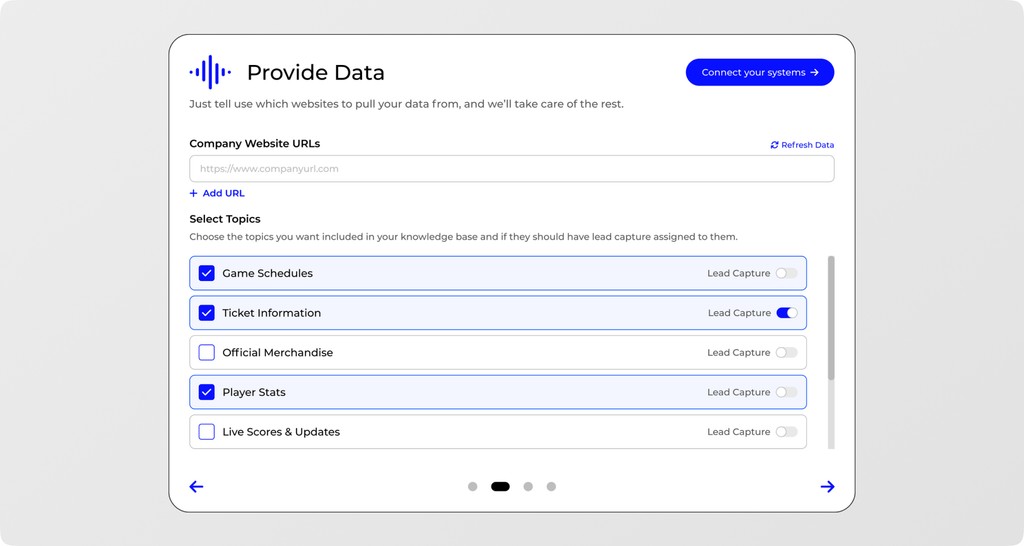
Conversica lets you build AI agents that run “persistent, two-way conversations” with prospects and customers across email, SMS, and web chat. Instead of waiting for buyers to reach out, these agents initiate and maintain multi-step dialogues, follow up on intent signals, and respond instantly to inbound questions. They’re trained on your content through RAG, so conversations reflect your brand voice and stay accurate without custom coding.
The tradeoff is setup effort. Conversica’s flexibility comes from building your own agents, training them on your materials, and configuring conversation flows for each use case. You get control and depth, but it requires time, content readiness, and ongoing tuning to keep agents aligned with your messaging and product updates.
How Conversica enables buyers with proactive, multi-channel conversations
Conversica helps buyers move through evaluation on their own timeline by meeting them in the channels they already use and responding with context-aware guidance. Agents tailor conversations to each persona — technical evaluators get integration details, CFOs get ROI context, and operational roles get workflow clarity.
In short, Conversica handles the gaps between human follow-ups, provides answers outside business hours, and qualifies interest based on the depth and direction of the conversation.
Conversica key features
- Knowledge engine: Load FAQs, policies, and structured content for accurate real-time answers.
- Omnichannel deployment: Design once and run across email, SMS, and chat.
- Pre-built skills: Choose from skills aligned to common outcomes without starting from scratch.
- Trigger actions: Schedule meetings, route leads, update plans, or launch workflows based on intent.
- Campaign injection: Integrate with MAP, CDP, and ABM tools to run conversation-driven programs.
Knowledge engine: Load FAQs, policies, and structured content for accurate real-time answers.
Omnichannel deployment: Design once and run across email, SMS, and chat.
Pre-built skills: Choose from skills aligned to common outcomes without starting from scratch.
Trigger actions: Schedule meetings, route leads, update plans, or launch workflows based on intent.
Campaign injection: Integrate with MAP, CDP, and ABM tools to run conversation-driven programs.
Conversica pricing
Conversica follows a custom pricing model. You can contact their team for a personalized quote.
3. Dock
Best for: B2B sales teams that want to standardize the buyer experience and remove the friction of fragmented follow-up.
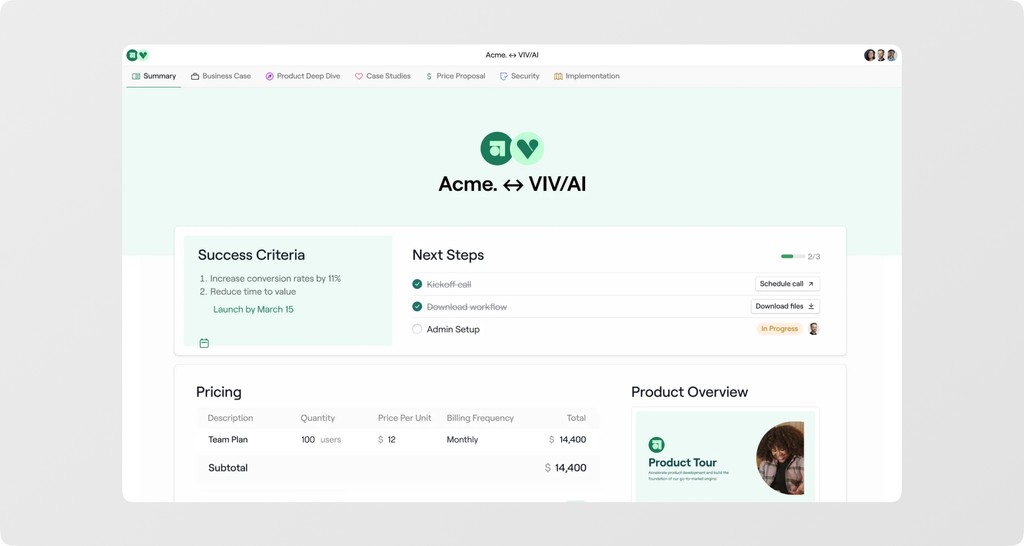
Dock is an AI-powered revenue enablement platform that gives buyers and sellers a shared workspace for every stage of the deal. Instead of sending scattered links and attachments, reps create client-facing workspaces that house proposals, demos, timelines, mutual action plans, and AI-generated content.
Templates can also pull in CRM data to auto-personalize each workspace. This standardizes what gets shared while saving sales reps hours of follow-up work. And because it integrates with Salesforce, HubSpot, Gong, Zoom, Loom, and more, you can embed PDFs, videos, and iframes in the deal room.
How Dock enables buyers with unified, self-serve deal rooms
The platform is built around the reality that most buying happens without sales in the room. Buying committees get one persistent, customizable workspace where they can review materials, comment, ask questions, and share with internal stakeholders. Everything from case studies to ROI calculators and technical docs lives in a single link.
Dock key features
- Centralized content hub: House proposals, demos, timelines, and technical docs in one shared workspace.
- Buyer collaboration: Let buyers comment, ask questions, and share the workspace internally.
- Mutual action plans: Track milestones, responsibilities, and next steps directly inside the workspace.
- Auto-personalized templates: Pull CRM fields into reusable templates to standardize follow-up.
- Stakeholder tracking: See who views what, how long they engage, and which content drives movement.
Centralized content hub: House proposals, demos, timelines, and technical docs in one shared workspace.
Buyer collaboration: Let buyers comment, ask questions, and share the workspace internally.
Mutual action plans: Track milestones, responsibilities, and next steps directly inside the workspace.
Auto-personalized templates: Pull CRM fields into reusable templates to standardize follow-up.
Stakeholder tracking: See who views what, how long they engage, and which content drives movement.
Dock pricing
Dock offers a free plan. Paid plans start at $350 per month for 5 users when billed monthly. Additional seats cost $50 per user, per month — on both the Standard and Premium plans.
4. Seismic
Best for: Enterprise B2B organizations needing unified revenue enablement across sales, marketing, and customer success.
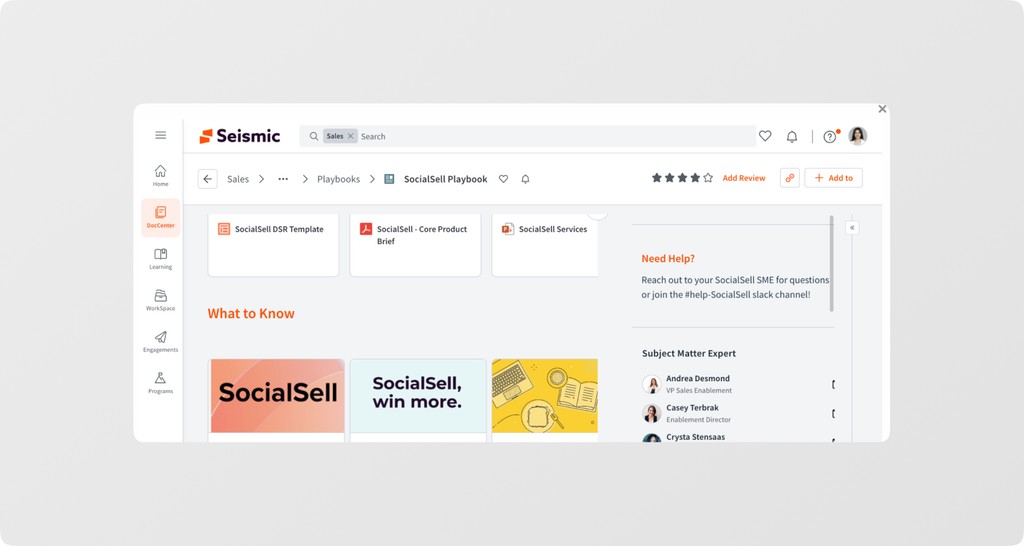
Where Dock focuses on giving buyers a clean, centralized deal workspace, Seismic serves organizations that want the buyer-facing experience tied tightly to content governance, rep training, content automation, and unified GTM operations.
Seismic’s buyer-facing features sit primarily in its Buyer Engagement pillar. LiveSend lets reps send buyers a single link to curated content, with real-time analytics on who viewed what, for how long, and whether it was forwarded internally. The rest of Seismic’s Enablement Cloud reinforces buyer enablement indirectly:
- Content Automation ensures the material buyers receive is consistent and personalized using dynamic templates.
- Learning & Coaching (Lessonly by Seismic) helps reps deliver more relevant, confident conversations — reducing the knowledge gaps that slow buyers down.
- Enablement Intelligence brings together content, training, engagement, and pipeline data to show which materials and seller behaviors actually move deals
Content Automation ensures the material buyers receive is consistent and personalized using dynamic templates.
Learning & Coaching (Lessonly by Seismic) helps reps deliver more relevant, confident conversations — reducing the knowledge gaps that slow buyers down.
Enablement Intelligence brings together content, training, engagement, and pipeline data to show which materials and seller behaviors actually move deals
This means a buying experience that’s more consistent, transparent, and predictable.
How Seismic enables buyers with context-relevant content experiences
Because Seismic ties content, messaging, and coaching together, buyers get a cohesive experience across every interaction — not a different story from every rep or function. This is buyer enablement at enterprise scale. It’s consistent information, frictionless access, and aligned teams supporting a smoother evaluation process.
Seismic key features
- LiveSend tracking: Send buyers a single link and see who viewed each asset, for how long, and whether it was forwarded.
- AI-powered search: Surface the right content quickly with role- and context-aware recommendations.
- Engagement analytics: Tie buyer activity to pipeline movement and measure how enablement initiatives influence pipeline and close rates.
- Optimization loops: Continuously refine content and training based on actual buyer response.
LiveSend tracking: Send buyers a single link and see who viewed each asset, for how long, and whether it was forwarded.
AI-powered search: Surface the right content quickly with role- and context-aware recommendations.
Engagement analytics: Tie buyer activity to pipeline movement and measure how enablement initiatives influence pipeline and close rates.
Optimization loops: Continuously refine content and training based on actual buyer response.
Seismic pricing
Seismic has gated its pricing but responses on G2 give you a range of $55k - $169k, per year. G2 reviews also mention the time to implement to be 4 months and time to ROI to be 16 months — quite typical for enterprise SaaS tools.
5. Champion
Best for: B2B SaaS companies with established customer bases where buying committees need peer validation through customer references.
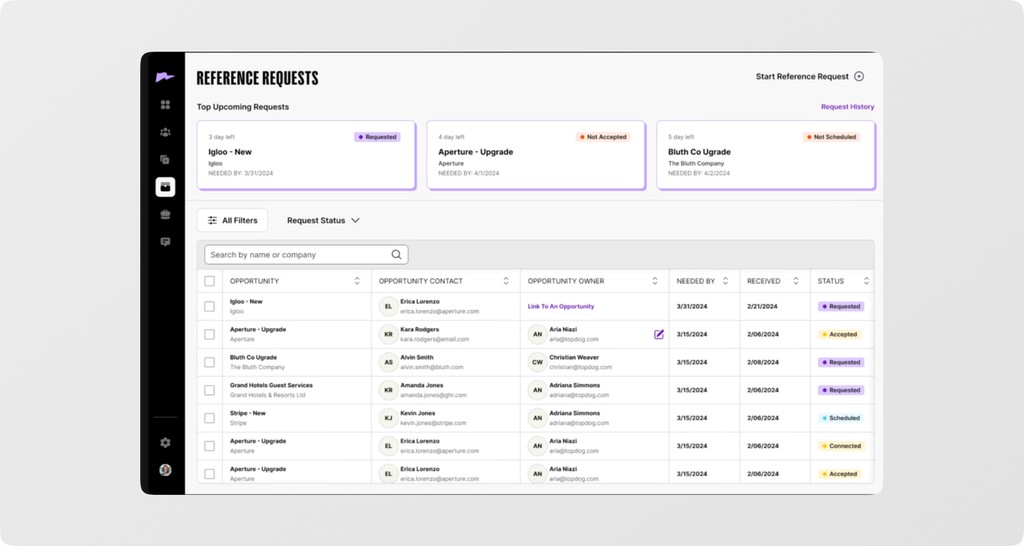
Champion is an AI-powered customer advocacy and reference platform, but it’s more than a contact directory. It automates finding the right customers, matching them to prospects, and managing introductions at scale so buyers get peer validation without waiting on sales to coordinate.
Basically, it surfaces relevant references by persona, industry, use case, and product line, then automates outreach and scheduling so prospects can speak with customers quickly. This gives buyers direct, unscripted validation they trust more than vendor messaging.
The platform also integrates with Salesforce (and similar CRMs) so sales reps can trigger reference requests from the opportunity page. Plus, interaction tracking measures which advocates influenced which deals and ties reference activity back to revenue impact.
How Champion enables buyers with on-demand customer proof
Champion shifts reference programs from reactive (buyer asks and sales scrambles) to proactive (relevant references are presented automatically as part of the deal workspace). That both improves buyer experience — faster, more relevant peer access — and frees sales from coordinating reference logistics, letting them focus on value conversations once buyer confidence is established.
Champion key features
- AI-driven advocate detection: Surface users most likely to influence deals or participate in advocacy.
- Automated reference matching: Instantly pair prospects with the right customers by role, industry, and use case.
- Advocacy attribution: Tie every act of advocacy — reference calls, referrals, reviews — to revenue impact.
- Customer-level ROI: Measure lifetime value and advocacy impact at the individual user level.
AI-driven advocate detection: Surface users most likely to influence deals or participate in advocacy.
Automated reference matching: Instantly pair prospects with the right customers by role, industry, and use case.
Advocacy attribution: Tie every act of advocacy — reference calls, referrals, reviews — to revenue impact.
Customer-level ROI: Measure lifetime value and advocacy impact at the individual user level.
Champion pricing
Champion doesn’t share its pricing publicly. You’ll have to contact their team for a custom quote.
6. Warmly
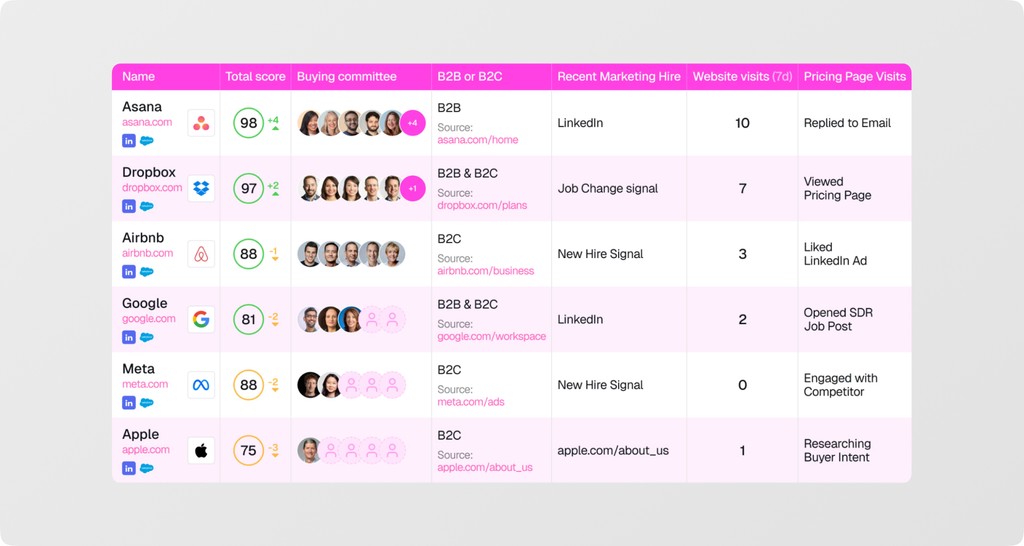
Warmly is a two-in-one platform: an AI inbound agent that engages high-intent website visitors in real time, and an AI outbound agent that runs autonomous, signal-based prospecting across email and LinkedIn. Together, they cover the earliest stages of the buyer journey — identifying who’s actually showing intent and engaging them before they disappear or competitors step in.
On the inbound side, Warmly de-anonymizes website visitors at the “individual” level and shows reps who are on the site right now, what they’re looking at, and whether they match ICP criteria. AI Chat greets visitors instantly with contextual prompts, answers questions, serves relevant collateral, and books meetings without requiring forms. SDRs can join active chats, take over when intent spikes, or escalate to live video with one click.
How Warmly enables buyers with real-time, frictionless engagement
Because Warmly surfaces person-level intent signals the moment someone arrives on your site, buyers aren’t treated like generic traffic or forced into rigid funnels. And as Warmly adapts automatically, high-intent signals trigger deeper conversations, and different personas receive responses aligned to their role — including things like discounts or custom CTAs.
For buying committees, this removes internal bottlenecks. Each stakeholder gets fast, specific answers without routing everything through a single champion or waiting for a coordinated meeting. The experience feels more like guided research and less like navigating a vendor’s hoops.
Warmly key features
- AI chat: Greet every visitor instantly with personalized, contextual messages.
- Granular workflow control: Set rules for each stage of the buyer’s journey across both inbound and outbound paths.
- Behavior-based triggers: Display personalized promotions like discounts, trial options and custom CTAs based on traffic source, persona, or intent level.
- Real-time segments: Build dynamic audiences using onsite and offsite signals at the person level — and push them to LinkedIn, Meta, or Google.
AI chat: Greet every visitor instantly with personalized, contextual messages.
Granular workflow control: Set rules for each stage of the buyer’s journey across both inbound and outbound paths.
Behavior-based triggers: Display personalized promotions like discounts, trial options and custom CTAs based on traffic source, persona, or intent level.
Real-time segments: Build dynamic audiences using onsite and offsite signals at the person level — and push them to LinkedIn, Meta, or Google.
Warmly pricing
Warmly starts at $20,000 per year, and they don’t offer monthly plans at the moment.
7. MindTickle
Best for: B2B revenue teams selling complex products where improving seller readiness directly improves the buyer experience.
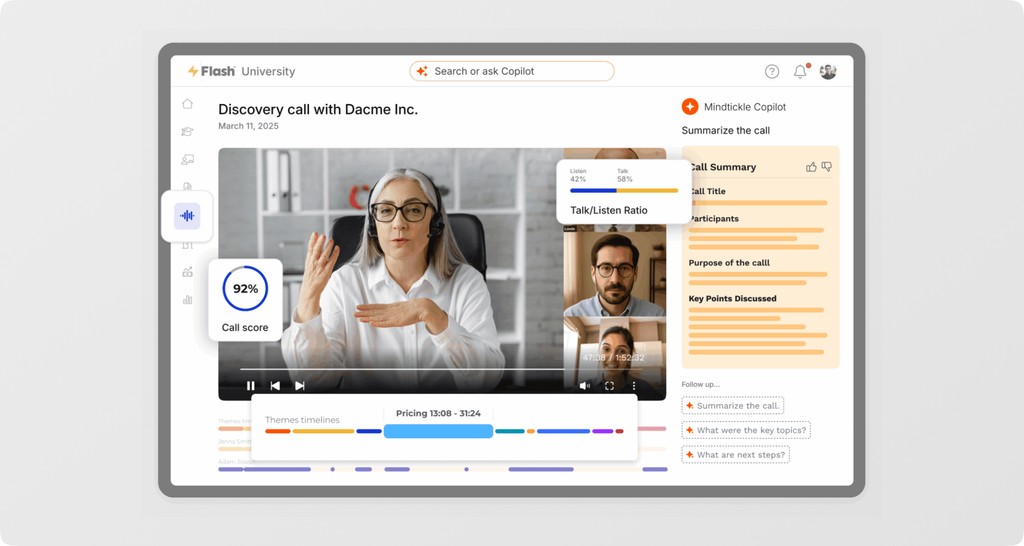
MindTickle is a revenue enablement platform built for companies where buyer enablement still relies heavily on seller performance. In categories where buyers need nuanced explanations, tailored demos, and confident objection handling — not just self-serve tours — Mindtickle focuses on making sellers the reliable source of clarity.
The buyer-facing layer comes through MindTickle’s Digital Sales Rooms. But because MindTickle connects training, content, and call insights, reps know exactly what buyers need at each stage. The Digital Sales Room isn’t just a content dump. It reflects a consistent, informed narrative shaped by real buyer questions and proven winning behaviors.
How MindTickle enables sellers to enable buyers the non-intrusive way
Instead of pushing more touchpoints, more meetings, or more follow-ups, it equips sellers with the skills and intelligence to deliver value when buyers actually need it. Conversation Intelligence shows reps the exact questions buyers ask, the objections that stall deals, and the competitive patterns shaping decisions.
The result is a buying experience that feels informed, timely, and low-pressure.
MindTickle key features
- Sales training: Build role-based learning paths with adaptive reinforcement so sellers stay sharp and aligned with what buyers expect at each stage.
- Digital sales rooms: Give buyers a single link containing curated content, call recordings, mutual action plans, and eSignature docs tailored to their evaluation.
- Deal intelligence: Combine CRM signals and conversation data to highlight deal risks, next steps, and where buyer engagement is stalling.
- Content hub: Centralize approved sales content with recommendations tied to deal stage, ensuring reps always share accurate, relevant materials.
Sales training: Build role-based learning paths with adaptive reinforcement so sellers stay sharp and aligned with what buyers expect at each stage.
Digital sales rooms: Give buyers a single link containing curated content, call recordings, mutual action plans, and eSignature docs tailored to their evaluation.
Deal intelligence: Combine CRM signals and conversation data to highlight deal risks, next steps, and where buyer engagement is stalling.
Content hub: Centralize approved sales content with recommendations tied to deal stage, ensuring reps always share accurate, relevant materials.
MindTickle pricing
While MindTickle doesn’t have a public pricing page, reviews on G2 put it at $47,000-$82,000.
8. Pitcher
Best for: Organizations with high-touch sales cycles like pharma, medtech, and manufacturing, where buyers expect meetings and fast follow-ups.
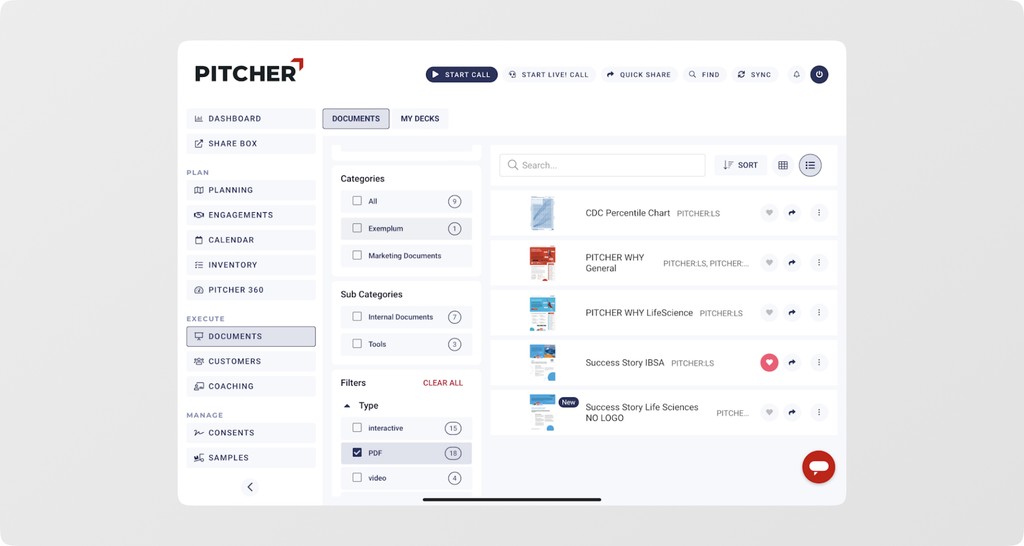
Pitcher is a sales enablement platform for teams with meeting-heavy sales cycles where buyers depend on pitch decks and multi-channel follow-ups. Pitcher’s buyer-facing value comes from personalization at the moment of interaction. Its AI assistant (PIA) builds customized agendas and pitch decks for each meeting, ensuring buyers only see what’s relevant to them. After the meeting, Pitcher generates precise follow-ups and allows reps to engage buyers through the channels they already use — WhatsApp, WeChat, SMS, or email.
How Pitcher enables sellers — and buyers — during meetings
Pitcher improves the buying experience by removing the generic, repetitive steps that usually slow rep-led evaluations. Buyers get presentations built around their goals, not a standard slide deck. They also receive accurate follow-ups instead of broad summaries.
And when they’re ready to move forward, they can review pricing or submit orders directly within the materials shared. So, instead of navigating a seller’s process, buyers get the information and actions they need in a format that fits their workflow.
Pitcher key features
- Personalized pitch decks: Create buyer-specific presentations and meeting agendas using PIA’s AI meeting prep.
- Engage across channels: Message buyers through WhatsApp, WeChat, SMS, or email directly from the Pitcher app.
- Streamline ordering: Let buyers place orders or request quotes directly from presentations or follow-up materials.
- Monitor engagement: Track which materials buyers view and how they interact during and after meetings.
Personalized pitch decks: Create buyer-specific presentations and meeting agendas using PIA’s AI meeting prep.
Engage across channels: Message buyers through WhatsApp, WeChat, SMS, or email directly from the Pitcher app.
Streamline ordering: Let buyers place orders or request quotes directly from presentations or follow-up materials.
Monitor engagement: Track which materials buyers view and how they interact during and after meetings.
Pitcher pricing
Pitcher also follows a custom pricing model. You can contact their team directly for a personalized quote.
9. VWO
Best for: Enterprises that rely on their website as a primary evaluation channel and need to deliver segment-specific experiences at scale.
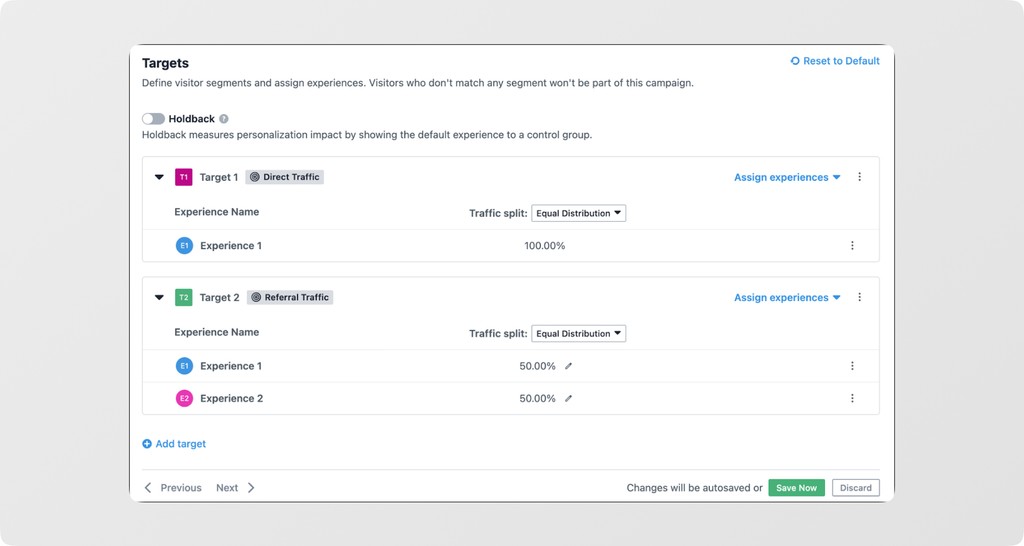
VWO is a digital experience optimization platform that combines A/B testing, behavior analytics, and website personalization. It’s built for teams that need to tailor on-site experiences for different visitor segments without writing custom code or depending heavily on engineering. All of VWO’s data — behavioral signals, visitor attributes, and third-party inputs — flows into a single workspace where teams can analyze behavior and serve relevant experiences.
VWO Personalize is the module that delivers those targeted experiences:
- First, you segment visitors using behavior, device/browser data, referral source, uploaded lists, and external data from analytics/CDPs/ABM tools.
- The, create personalized page variations with the visual editor or code editor — changing banners, messages, overlays, layouts, or adding custom widgets.
- Finally, trigger those experiences based on rules or actions like scroll depth, time on page, returning visitor status, or event activity.
First, you segment visitors using behavior, device/browser data, referral source, uploaded lists, and external data from analytics/CDPs/ABM tools.
The, create personalized page variations with the visual editor or code editor — changing banners, messages, overlays, layouts, or adding custom widgets.
Finally, trigger those experiences based on rules or actions like scroll depth, time on page, returning visitor status, or event activity.
All personalized experiences run on the same URL and are measured through VWO’s reporting, so teams can see which versions drive conversions across segments.
How VWO enables buyers with context-aware website experiences
VWO helps buyers by removing irrelevant noise from the website experience. Different visitors see content aligned to who they are and what they’re doing. Instead of navigating generic pages, buyers get messaging, offers, and UI elements that fit their needs and stage. Returning buyers don’t start over; they see continuity based on past behavior. High-intent visitors see more specific proof points or CTAs. And personas with different priorities receive content that reflects their context without digging through menus or pages. The result is a website that adjusts to the buyer, not the other way around.
VWO key features
- Build unified visitor segments: Combine behavior, device/browser data, referral source, uploaded attributes, and third-party data in a single segmentation layer.
- Measure impact by segment: Track conversions and performance in real time across experience variants and visitor cohorts.
- Apply layered personalization: Prioritize or randomize which experience shows when a visitor qualifies for multiple segments.
- Create dynamic on-page variations: Use the visual editor to modify banners, text, layouts, or widgets without engineering support.
Build unified visitor segments: Combine behavior, device/browser data, referral source, uploaded attributes, and third-party data in a single segmentation layer.
Measure impact by segment: Track conversions and performance in real time across experience variants and visitor cohorts.
Apply layered personalization: Prioritize or randomize which experience shows when a visitor qualifies for multiple segments.
Create dynamic on-page variations: Use the visual editor to modify banners, text, layouts, or widgets without engineering support.
VWO pricing
VWO’s paid plans start at around $249 per product, per month, and vary depending on the number of monthly tracked users (MTUs).
How to choose your buyer enablement software
With so many tools promising “better buyer experiences,” the challenge isn’t finding options — it’s choosing the ones that fit your GTM motion and your buyers’ evaluation habits.
We suggest you start with these criteria:
- Pick tools that align with your GTM model: Your software should fit how you actually sell — PLG teams need self-serve demos and contextual product access, SLG teams need workspace-driven collaboration and rep-led enablement, and hybrid models need both. Don’t force a tool into a motion it wasn’t built for.
- Evaluate time to implement and time to ROI: Some tools deliver value in days (interactive demos, AI chat, deal rooms). Others need months of onboarding, content prep, and change management. Be honest about whether you have the bandwidth, content readiness, and internal champions to support the rollout.
- Check whether the tool can serve multiple personas: If the platform can’t deliver role-specific content — technical, financial, operational — without custom work, it won’t support real buying committees. Look for tools that generate or route content automatically by persona.
- Prioritize platforms that capture buyer intent: You want tools that show which stakeholders are active, what they care about, and where they stall — not just opens or clicks. Even better if it can unify intent signals from your website, demos, content, and conversations.
- Make sure non-technical teams can DIY things: If every update requires engineering or design cycles, the tool will die on the vine. Pick software with editors, templates, and automation that marketing, sales, or enablement can own without waiting on a sprint.
Pick tools that align with your GTM model: Your software should fit how you actually sell — PLG teams need self-serve demos and contextual product access, SLG teams need workspace-driven collaboration and rep-led enablement, and hybrid models need both. Don’t force a tool into a motion it wasn’t built for.
Evaluate time to implement and time to ROI: Some tools deliver value in days (interactive demos, AI chat, deal rooms). Others need months of onboarding, content prep, and change management. Be honest about whether you have the bandwidth, content readiness, and internal champions to support the rollout.
Check whether the tool can serve multiple personas: If the platform can’t deliver role-specific content — technical, financial, operational — without custom work, it won’t support real buying committees. Look for tools that generate or route content automatically by persona.
Prioritize platforms that capture buyer intent: You want tools that show which stakeholders are active, what they care about, and where they stall — not just opens or clicks. Even better if it can unify intent signals from your website, demos, content, and conversations.
Make sure non-technical teams can DIY things: If every update requires engineering or design cycles, the tool will die on the vine. Pick software with editors, templates, and automation that marketing, sales, or enablement can own without waiting on a sprint.
Go buyer-first in 2026 with Layerpath
The way buyers evaluate software has changed for good. They want fast answers, honest product visibility, and the freedom to explore without sitting through a scheduled demo. The tools in this guide all point to the same trend: the more control you give buyers, the smoother the deal moves.
So if 2026 is about going buyer-first, then start by giving buyers the clarity they need to evaluate on their own.
Related reading
Frequently asked questions
1. What’s the difference between buyer enablement and sales enablement?
Sales enablement improves the seller’s ability to sell — training, content for reps, process tools, and activity tracking. Buyer enablement, on the other hand, improves the buyer’s ability to buy with self-serve information, personalized experiences, shared workspaces, and buyer-side visibility.
2. How do buyer enablement tools affect deal cycles?
Buyer enablement platforms shorten cycles by giving buyers faster access to answers, reducing back-and-forth communication, and keeping all stakeholders aligned. When buyers don’t need to wait for a rep to clarify basic questions, deals progress more predictably.
3. Do buyer enablement tools replace sales reps?
No. They support the parts of evaluation buyers prefer to handle themselves. Reps still lead tailored conversations, negotiations, and later-stage guidance, but the early and mid-stage research moves faster because buyers can access what they need on their own.
4. Is buyer enablement the same as product-led growth?
No. Product-led growth focuses on product access as the primary acquisition channel. Buyer enablement is broader — it covers content, demos, collaboration, and stakeholder alignment. PLG can be part of buyer enablement, but buyer enablement applies even when the product isn’t self-serve.
5. What metrics should teams track to measure buyer enablement impact?
Start by tracking buyer-side signals like content engagement, stakeholder participation, demo completion, stage progression, and overall deal velocity. Then, go a step further by tracking intent. This includes analyzing the questions buyers ask, the paths they explore, repeat visits, feature-level interest, and behavioral patterns captured through website analytics, demo interactions, and conversational tools.