
What this update changed: we rechecked every price on the vendor's own pricing page and added our screenshot of each page, a dated price table, and a seat-cost calculator. Tool descriptions were checked against each vendor's own site, and the Layerpath section now shows a real project as a tour and as a guide.
Product walkthrough software comes in three kinds. In-app guidance tools, such as Chameleon and Intro.js, show tours inside your live product. Captured walkthrough tools, such as Layerpath, Supademo, and Navattic, turn your product screens into a tour you share by link or embed. Video and documentation tools, such as Loom and Descript, record and edit narrated video. Choose by where your viewer is and how often your product changes.
We focused on platforms that create actual walkthroughs (in-app guidance, clickable interactive demos, or video tours), not just screen recordings. The goal was to cover the main formats teams use for onboarding, customer education, sales, and marketing.
Disclaimer: Layerpath publishes this guide and is one of the tools in it. We tried to keep it fair, and we say where another tool is the better fit.
When evaluating each tool, we looked at:
- Walkthrough types supported: In-app tours, interactive demos, video walkthroughs, and HTML-based experiences
- Usability: How easy it is to create, edit, customize, and deliver demos without technical expertise
- Maintenance: What it takes to update a walkthrough when one screen in your product changes
- Total cost of ownership: Beyond monthly fees, including implementation time, training costs, and ongoing maintenance
For the original guide we checked help docs, release notes, pricing pages, and public reviews, and tested tools where we could. For this update we rechecked prices and plan details on each vendor's official pricing page, and checked each tool's described features against the vendor's own website and documentation. The goal is to give you a clear sense of how each tool works, what it does best, and when it would be right for you.
Product walkthrough software at a glance
Prices were checked on each vendor's pricing page on October 26, 2026.
| Tool | Best for | Type | Pricing |
|---|---|---|---|
| Layerpath | Teams that keep product walkthroughs current across formats | Interactive tours, step-by-step guides, video exports | Free plan available; Pro is $50 per seat per month |
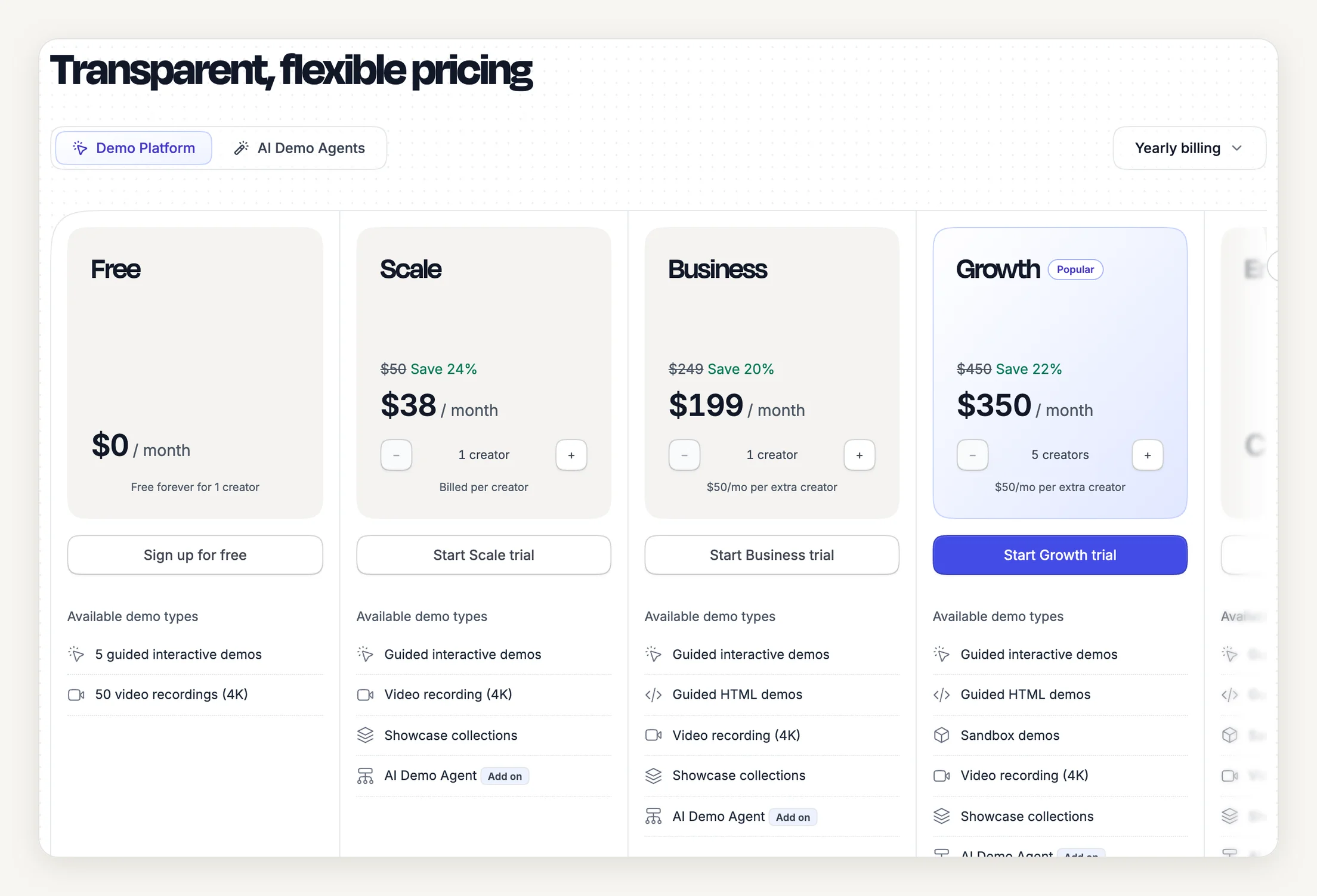
| Supademo | Startups with limited budgets | Screenshot and HTML interactive demos | Free plan available; Scale is $50 per creator per month, or $38 billed annually |
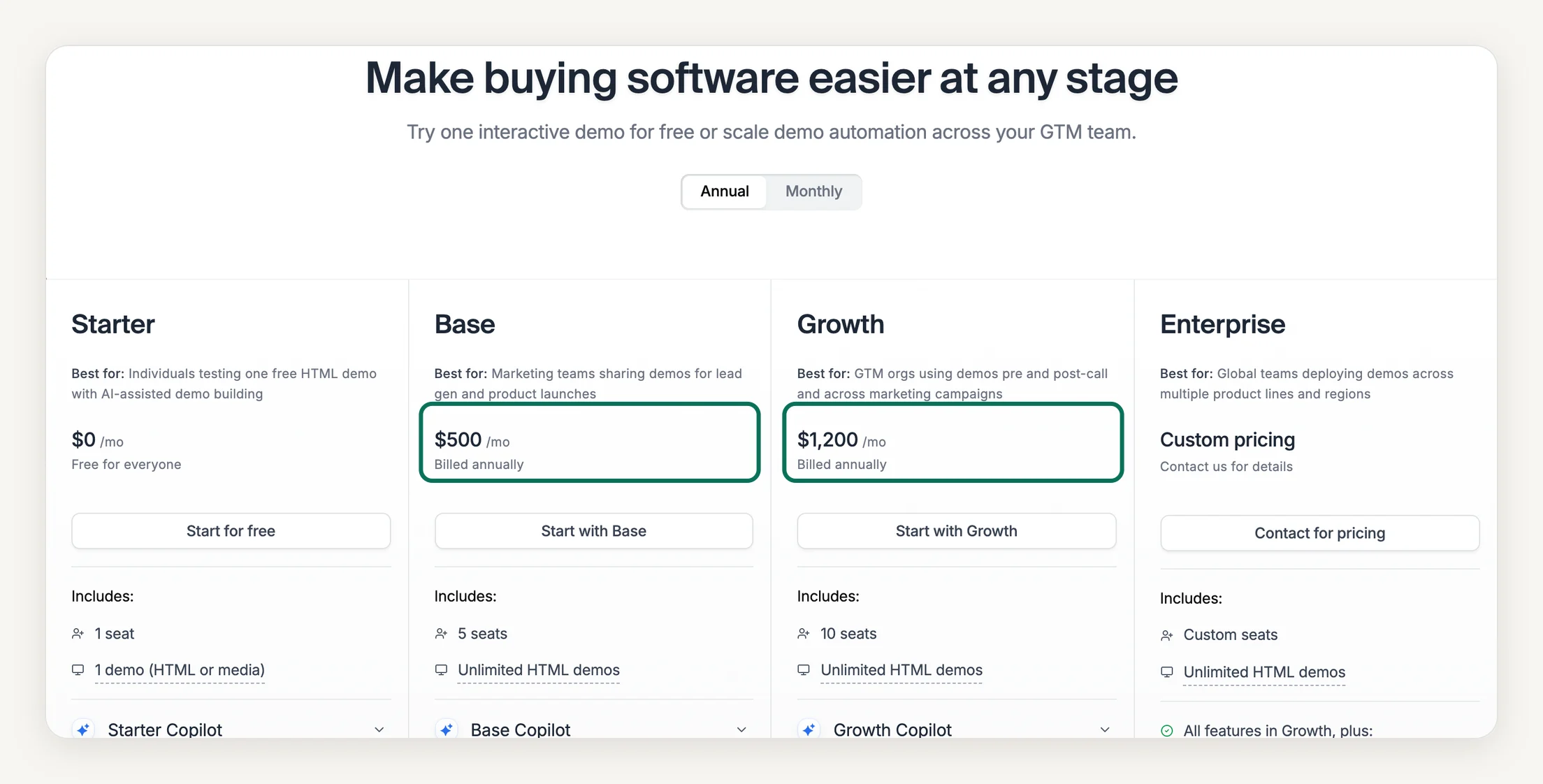
| Navattic | SDR and outbound outreach at enterprises | HTML interactive demos | Free Starter plan for 1 seat and 1 demo; Base is $500 a month billed annually, or $600 monthly, with 5 seats |
| Consensus | Scaling presales with automated demo delivery | AI demo agents, interactive and video demos | Not published |
| Loom | Quick video demos on social media and emails | Video demos | Free plan available; Business is $18 per user per month |
| Descript | Teams needing advanced post-production features | Video demos | Free plan available; Hobbyist is $16 per person per month billed annually, or $24 monthly |
| Chameleon | Teams needing interactive demos integrated into user onboarding | In-app tours, interactive demos | No free plan listed; the Startup plan starts at $279 for 2,000 MTUs |
| Intro.js | Indie app developers who want open source software | In-app tours | Free under the AGPL open-source license; commercial licenses start at $9.99, one time |
Prices and team costs, side by side
These tools price in different units: per seat, per creator, per person, per user, by monthly tracked users, or as a one-time license. The table lists every plan with the date we checked it; each date links to the vendor's pricing page.
| Tool | Plan | Price | Notes | Checked |
|---|---|---|---|---|
| Layerpath | Free | Free | Up to 3 projects published at a time | October 26, 2026 |
| Pro | $50 per seat a month billed monthly, or $500 per seat a year | |||
| Team | $500 a month billed monthly, or $5,000 a year, 5 seats included, extra seat $50 a month | |||
| Enterprise | Custom, from $10,000 a year | Custom contract from $10,000 per year | ||
| Supademo | Free | Free | 5 guided interactive demos | October 26, 2026 |
| Scale | $50 per creator a month billed monthly, or $38 per creator a month billed annually | |||
| Business | $249 a month billed monthly, or $199 a month billed annually, 1 creator included, extra creator $50 a month | First plan with guided HTML demos | ||
| Growth | $450 a month billed monthly, or $350 a month billed annually, 5 creators included, extra creator $50 a month | |||
| Enterprise | Custom | |||
| Navattic | Starter | Free | 1 demo | October 26, 2026 |
| Base | $600 a month billed monthly, or $500 a month billed annually, 5 seats included | 5 seats, unlimited HTML demos; extra seat price not stated | ||
| Growth | $1,400 a month billed monthly, or $1,200 a month billed annually, 10 seats included | 10 seats; extra seat price not stated | ||
| Enterprise | Custom | |||
| Consensus | Custom | Not published | October 26, 2026 | |
| Loom | Starter | Free | Up to 50 members, 25 videos per person, 5 minutes per recording | October 26, 2026 |
| Business | $18 per user a month billed monthly | Annual billing saves up to 17% | ||
| Business + AI | $24 per user a month billed monthly | Annual billing saves up to 17% | ||
| Enterprise | Custom | |||
| Descript | Free | Free | 1 media hour a month | October 26, 2026 |
| Hobbyist | $24 per person a month billed monthly, or $16 per person a month billed annually | 10 media hours a month | ||
| Creator | $35 per person a month billed monthly, or $24 per person a month billed annually | 30 media hours a month per person | ||
| Business | $65 per person a month billed monthly, or $50 per person a month billed annually | 40 media hours a month per person | ||
| Enterprise | Custom | |||
| Chameleon | Startup | From $279 | Starts at $279 for 2,000 MTUs; billing interval not stated | October 26, 2026 |
| Pro | From $750 a month | From $750 a month for 5,000 MTUs, billed monthly | ||
| Growth | From $1,750 a month, billed annually | From $1,750 a month for 5,000 MTUs, billed annually | ||
| Enterprise | Custom | |||
| Intro.js | Starter | $9.99 one time | 1 project | October 26, 2026 |
| Business | $49.99 one time | 5 projects | ||
| Premium | $299.99 one time | Unlimited projects |
For the tools priced by the person who builds walkthroughs, the calculator shows what a team pays each month on the cheapest published paid plan that fits. Consensus does not publish prices, Chameleon prices by monthly tracked users, and Intro.js sells one-time licenses, so they are not in it.
What it costs for 5 people creating content
Cheapest published paid plan for that team size, billed monthly. List prices from each vendor's pricing page; taxes and discounts are not included.
| Tool | Plan | Cost a month | Checked |
|---|---|---|---|
| LayerpathFree plan: Free | Team | $500 | October 26, 2026 |
| SupademoFree plan: Free | Scale | $250 | October 26, 2026 |
| NavatticFree plan: Starter | Base | $600 | October 26, 2026 |
| LoomFree plan: Starter | Business | $90 | October 26, 2026 |
| DescriptFree plan: Free | Business | $325 | October 26, 2026 |
“Not published” means the plan fits but the vendor's page gives no price for this billing period; “Custom” means a quote. We never estimate either.
1. Layerpath
- Best for: Teams that keep product walkthroughs current across formats
- Type: Interactive tours, step-by-step guides, and video exports
Layerpath pros
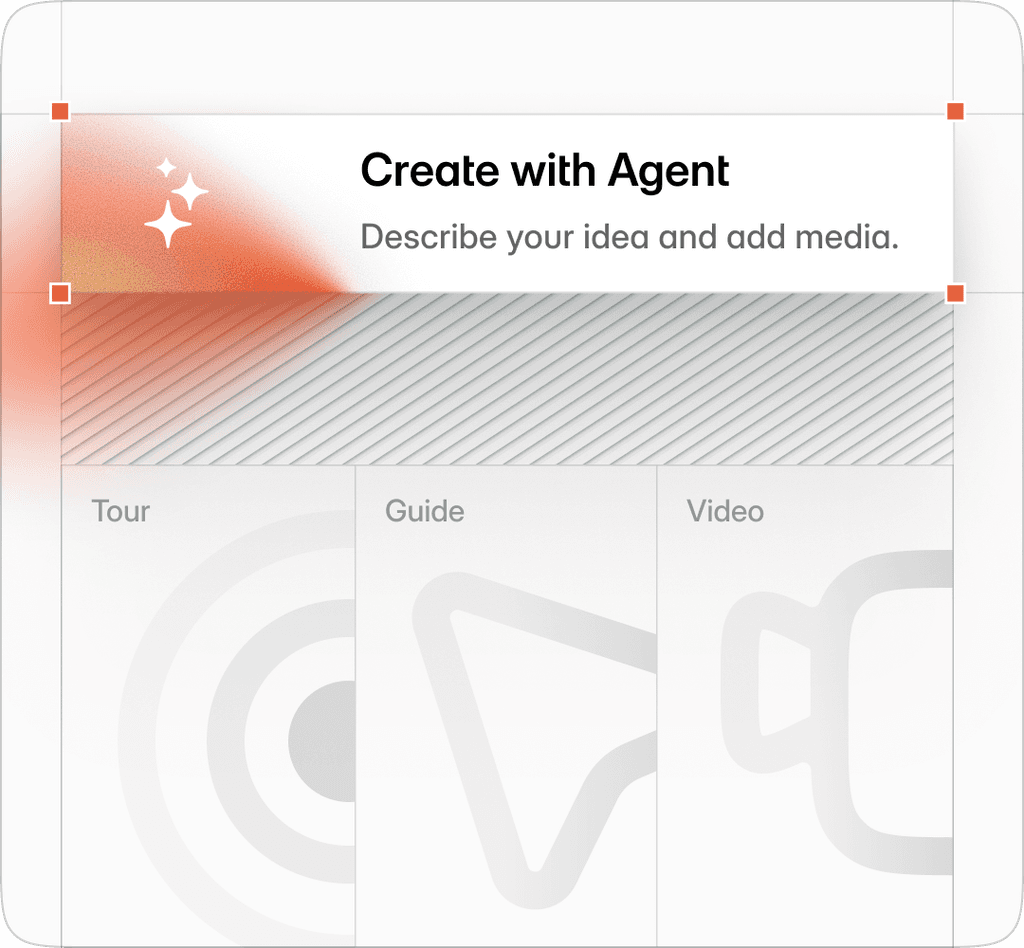
- One project gives you an interactive tour, a step-by-step guide, and a video export
- Turns existing videos, including Loom and YouTube links, into an editable tour
- When the product changes, you edit the steps that changed instead of re-recording
- Self-serve setup on the Free and Pro plans
Layerpath cons
- No HTML capture: tours are built from screenshots and recordings
- Does not run in-app tours inside your product
- Does not detect product changes for you; you choose which steps to update
Layerpath turns a software workflow into an interactive tour, a step-by-step guide, and a video export from one project. Teams use it for customer education, onboarding, support, and internal software training. It is not an in-app adoption platform or a learning management system: it creates the walkthroughs that your help center, onboarding emails, and training pages link to.
To start, record a workflow with the Layerpath Chrome extension, upload screenshots or a video, or import a Loom or YouTube link. Layerpath turns it into steps you can edit in the editor: adjust callouts and hotspots, zoom and pan, and add AI voiceover in multiple languages. Edit with Agent lets you change many steps with a prompt, and you review the changes before publishing.
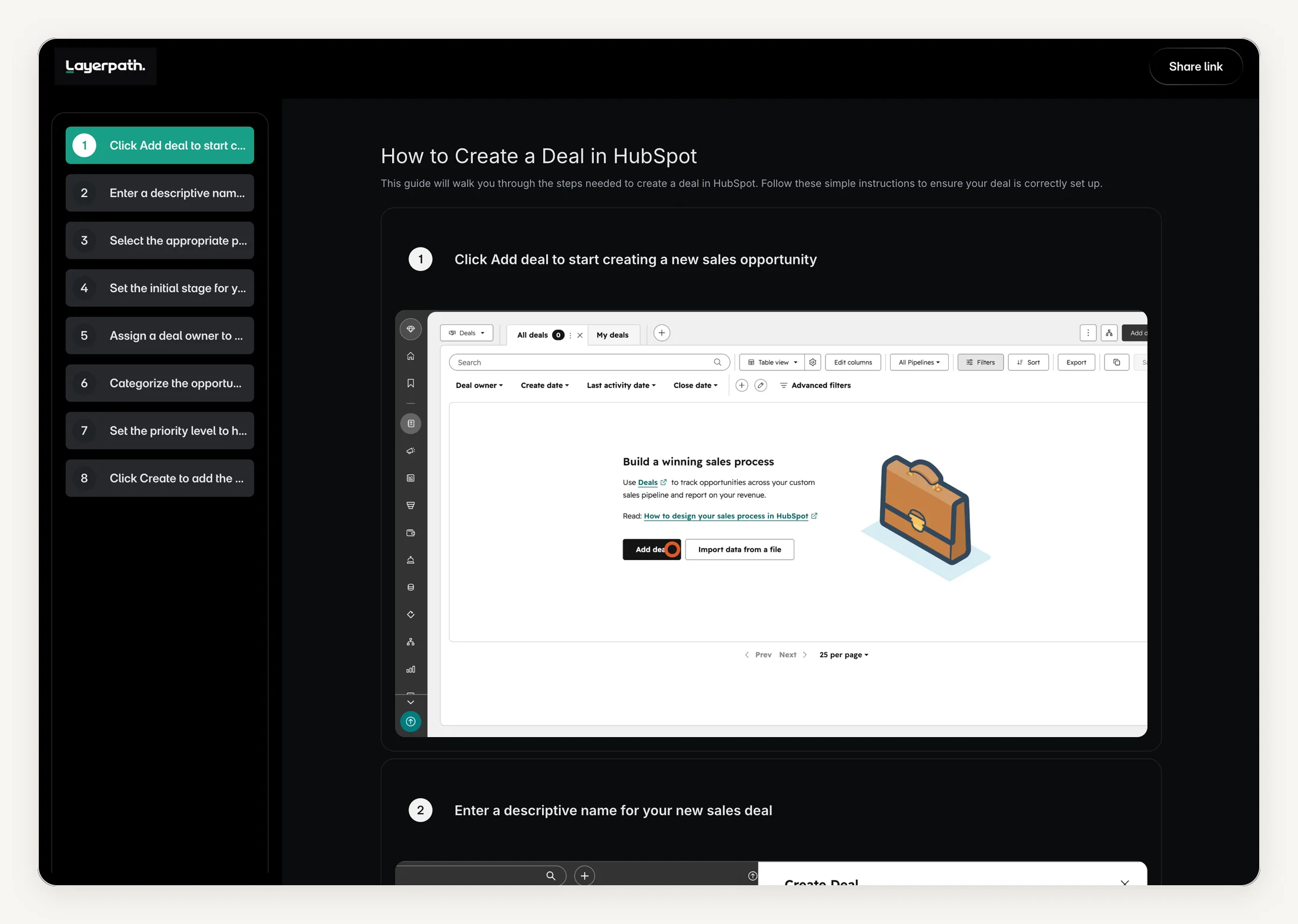
Here is one project we built of an eight-step HubSpot task, first as an interactive tour and then as the step-by-step guide published from the same project.
Interactive Layerpath tour: How to create a deal in HubSpot. One Layerpath project of an eight-step HubSpot task, published as an interactive tour. The guide below comes from the same project.
- Click Add deal to start creating a new sales opportunity
- Enter a descriptive name for your new sales deal
- Select the appropriate pipeline to track this deal's progress
- Set the initial stage for your new sales deal
- Assign a deal owner to manage this sales opportunity
- Categorize the opportunity by selecting a deal type
- Set the priority level to highlight urgent sales opportunities
- Click Create to add the deal to your pipeline
Layerpath features
- Full-featured editor: Build and customize tours with editing features that include zooming, panning, callouts, and hotspots
- Multiple formats: An interactive tour, a step-by-step guide, and a video export from one project
- AI: Edit with Agent for prompt-based edits, and AI voiceover in multiple languages
- Brand memory: Apply your brand colors, fonts, and voice across projects
- Sharing: Public links and embeds for websites, help centers, LMS platforms, email, and Notion, plus a custom domain on paid plans
- Team workspace: A shared workspace with Owner, Admin, Editor, and Viewer roles on the Team plan
- Insights: Viewer drop-off, step replays, and completion rates for each walkthrough
Layerpath pricing
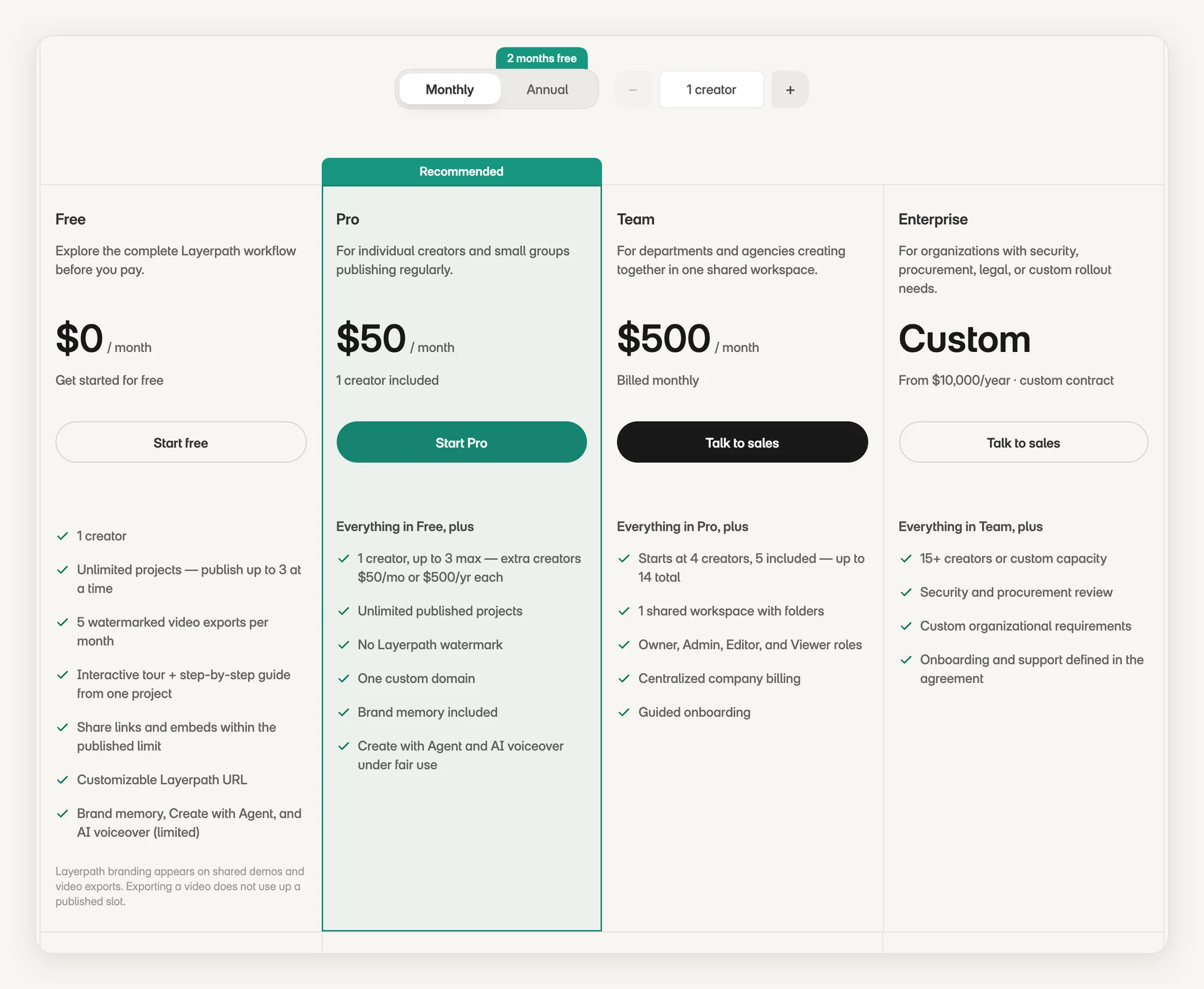
Prices from Layerpath's pricing page, checked October 26, 2026. Free is $0 for one seat, with up to 3 projects published at a time. Pro is $50 per seat per month billed monthly, or $500 per seat per year billed annually, for up to 3 seats. Team is $500 per month or $5,000 per year, with 5 seats included and extra seats at $50 per month, up to 14. Enterprise is a custom contract starting at $10,000 per year. A seat is one person who creates and edits projects; viewers are free. See pricing for current plans.
TL;DR
Choose Layerpath if the same walkthroughs need to stay current as an interactive tour, a guide, and a video, and you want to update the steps that changed instead of re-recording.
Skip it if you need in-app tours that run inside your product, or HTML-captured demos.
The HubSpot tour above is the same one on our example page for creating a deal in HubSpot. It is an illustration, not a customer story or a HubSpot endorsement. If your walkthroughs already live in Loom, the free recording-to-guide tool turns a public Loom link into numbered steps with screenshots.
2. Supademo
- Best for: Startups with limited budgets
- Types: Screenshot and HTML-based demos
Supademo pros
- Demos can be triggered inside your product as an in-app modal for onboarding
- Integrates with tools such as HubSpot, Salesforce, Slack, and Marketo
Supademo cons
- HTML demos start on the Business plan, at $199 per month billed annually or $249 monthly
- Sandbox demo environments are a Growth plan feature, and AI demo agents are a paid add-on
- The free plan is limited to one creator and five guided interactive demos
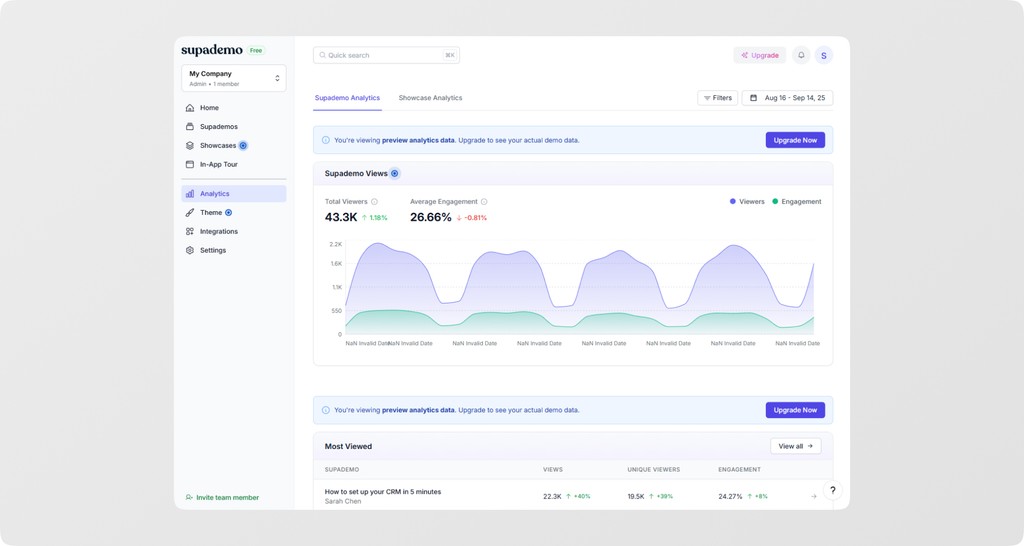
Supademo is an interactive demo platform for screenshot-based guided demos, HTML demos, and screen recordings, including demos you can open inside your own product for onboarding.
It tracks engagement, drop-off, and conversion for each demo, lets you add lead capture and calendar booking steps, and offers sandbox demo environments and AI demo agents on higher plans.
Supademo features
- HTML editing: Edit text and images in HTML demos, from the Business plan up
- In-app demos: Trigger a demo inside your product as a modal or from a launcher
- Lead capture and booking: Collect lead details or book a meeting inside a demo
- Desktop apps: Record with Supademo's Mac and Windows desktop apps
- AI demo agents: Agents that guide prospects through a demo, as a paid add-on
Supademo pricing
Supademo has a free plan for one creator with five guided interactive demos. Scale is $50 per creator per month, or $38 per creator per month billed annually. HTML demos start on the Business plan, at $249 per month or $199 per month billed annually, with one creator included and more at $50 per month each. Growth is $450 per month, or $350 per month billed annually, with five creators. Prices checked on supademo.com/pricing, October 26, 2026.
TL;DR
Choose Supademo if you're a small team that wants guided interactive demos with a free plan and a low entry price.
Skip it if HTML demos or sandbox environments are essential and the Business or Growth plan is beyond your budget.
3. Navattic
- Best for: SDR and outbound outreach at enterprises
- Types: HTML-based demos
Navattic pros
- Captures web apps as interactive HTML copies, including scrolling and hover states, with a Chrome extension
- Connects to CRM, marketing automation, and analytics tools to sync engagement activity
Navattic cons
- Paid plans start at $500 a month billed annually, or $600 billed monthly
- The free Starter plan is limited to one seat and one demo
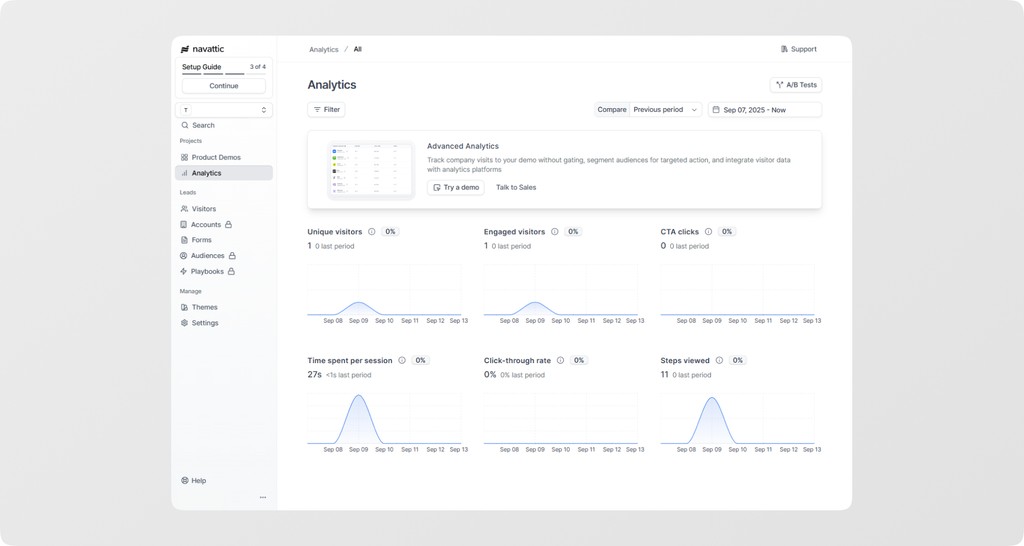
Navattic is an interactive demo platform built for go-to-market teams. You capture your web app with a Chrome extension and edit the result in a no-code editor, with an AI Copilot that takes plain-language edits. Its strength is how closely demos connect to sales tools and workflows.
Its Launchpad product helps sales teams understand buyer interest, and Navattic Agents run AI conversations that guide and qualify prospects.
Navattic features
- Demo personalization: Share personalized demos with prospects
- AI Copilot: Build and edit demos from plain-language requests
- Integrations: Sync engagement activity to your CRM, marketing automation, and analytics tools
- Navattic Agents: AI agents that guide and qualify prospects in conversation
Navattic pricing
Navattic's Starter plan is free for one seat and one demo. Base is $500 a month billed annually, or $600 billed monthly, with 5 seats and unlimited HTML demos. Growth is $1,200 a month billed annually, or $1,400 monthly, with 10 seats. Navattic does not list a price for extra seats. A startup plan for bootstrapped and seed-stage teams of 30 or fewer is priced on request, and Enterprise is custom. Checked on navattic.com/pricing, October 26, 2026.
TL;DR
Choose Navattic if you're an enterprise sales team that wants HTML demos tied closely to your CRM and sales workflows.
Skip it if you need a paid plan under $500 a month, or more than one demo on the free plan.
4. Consensus
- Best for: Scaling presales with automated demo delivery
- Types: AI demo agents, interactive demos, video demos
Consensus pros
- Several demo formats in one platform: AI demo agents, self-guided interactive demos, on-demand video demos, and live sessions
- Demo Intelligence shows who is involved in a deal and what they care about
Consensus cons
- Prices are not published; pricing is based on per-user licenses and optional usage-based capabilities
- Built around buyer-facing demos for presales teams
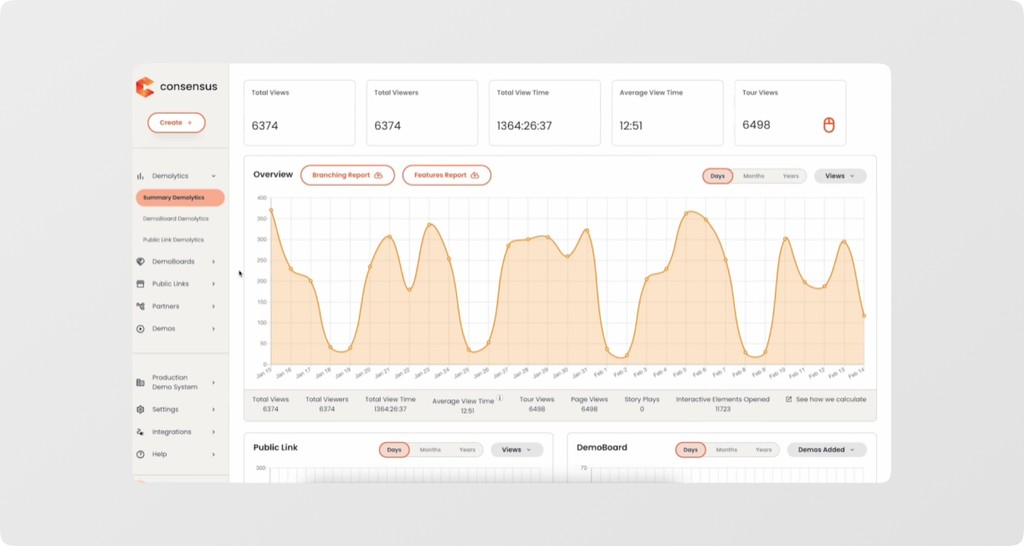
Consensus is a demo platform for presales teams. It offers AI demo agents, self-guided interactive demos, on-demand video demos, and live sessions, so buyers can see the product the way they prefer.
Its Demo Intelligence turns demo activity into insight about who is involved in a deal and what they care about.
Consensus features
- AI demo agents: Let an AI agent present the product to buyers
- Interactive demos: Self-guided product tours
- On-demand video demos: Shareable video demos buyers can watch any time
- Demo Intelligence: Insight into who is involved and what they care about
Consensus pricing
Consensus does not publish prices. Its pricing page says pricing is based on per-user licenses and optional usage-based capabilities, and asks you to contact the team for a package. Checked on goconsensus.com/pricing, October 26, 2026.
TL;DR
Choose Consensus if your presales team wants AI, self-guided, video, and live demos in one platform, with insight into the buying group.
Skip it if you want published, self-serve pricing.
5. Loom
- Best for: Quick video demos on social media and emails
- Demo type: Video demos
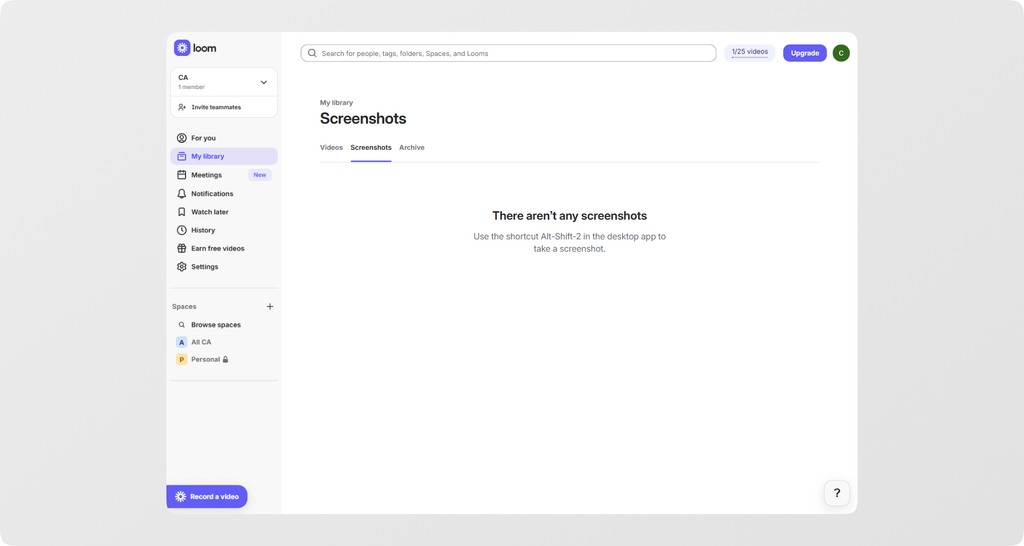
Loom pros
- Free Starter plan, so it is easy to get started
- Records on Mac, Windows, iOS, Android, and in Chrome
- Comments, emoji reactions, and viewer insights on every video
Loom cons
- Editing features such as edit by transcript need the Business + AI plan
- When your product's interface changes, the affected parts of a video usually need re-recording
- Removing Loom branding needs the Business plan or higher
Loom is built for quick, asynchronous video messages, letting teams share updates, explanations, and feedback without scheduling calls. Teams also use it for short video demos and on-the-go walkthroughs for customers and prospects.
Loom focuses on video messages rather than structured, interactive demos. Its strength is speed: record, get a link, and send. For clickable demos, or walkthroughs you update step by step, a dedicated tool fits better.
Loom features
- Recording: Record on Mac, Windows, iOS, Android, or with the Chrome extension
- AI features: Transcripts and captions in 50+ languages, auto summaries, and on Loom's AI plans, a written doc such as an SOP or step-by-step guide from a recording
- Instant sharing: Share via link, with video and viewer insights
- Engagement tools: Add emojis, comments, tasks, and CTAs to a video
- Integrations: Works with Slack, Google Workspace, Jira, and more
Loom pricing
Loom has a free Starter plan for up to 50 members, with 25 videos per person and 5 minutes per recording. Business is $18 per user per month and Business + AI is $24 per user per month, billed monthly; Loom says annual billing saves up to 17%. Enterprise pricing is custom. Checked on loom.com/pricing, October 26, 2026.
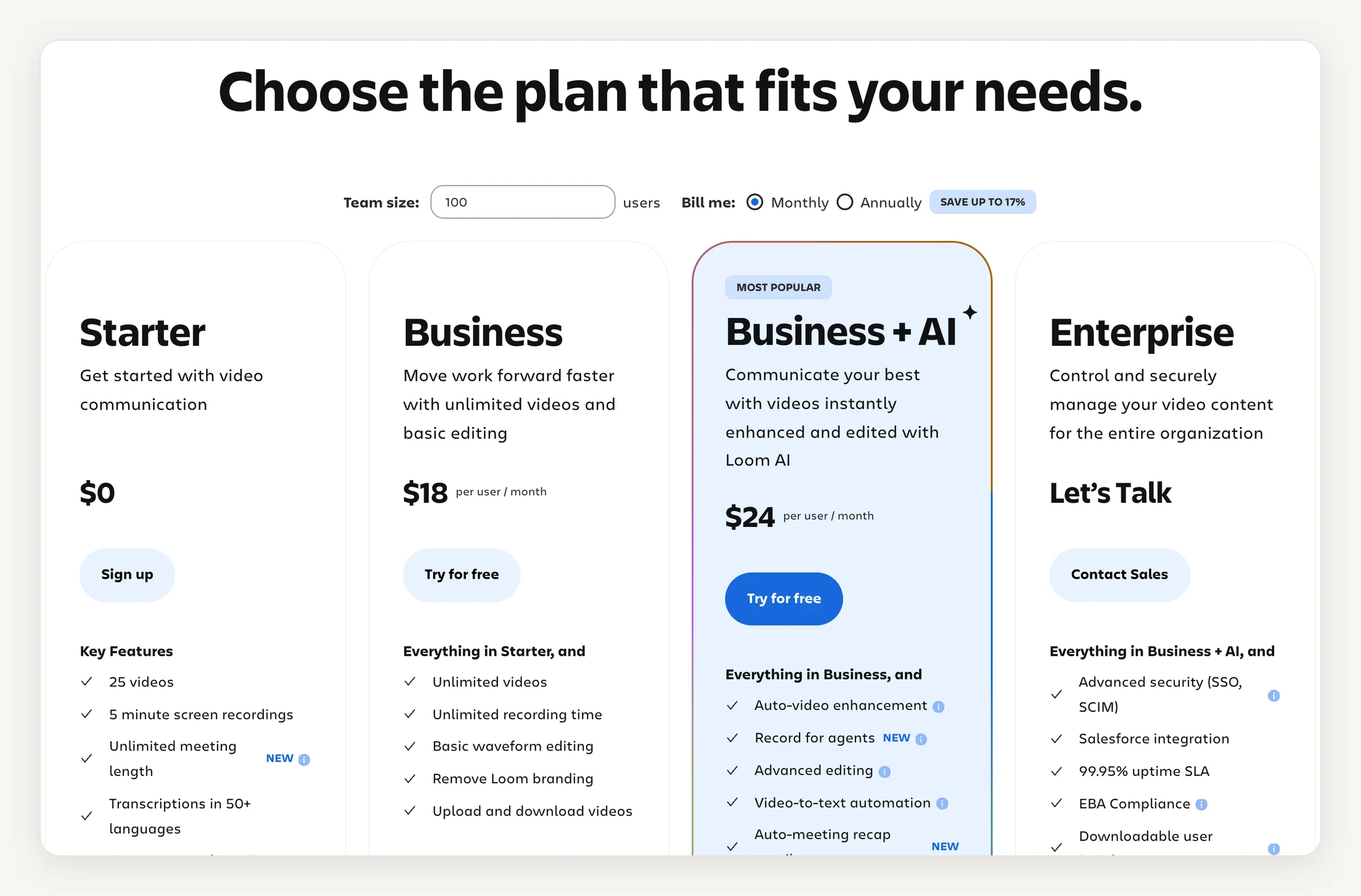
This makes Loom a good option for short, informal video walkthroughs of your product. For interactive demos, or walkthroughs you update step by step, a dedicated tool fits better.
TL;DR
Choose Loom if you want fast, informal video demos or on-the-go walkthroughs, especially for social media or internal updates.
Skip it if you need interactive, clickable demos or walkthroughs you update step by step.
6. Descript
- Best for: Teams needing advanced post-production features
- Demo type: Video demos
Descript pros
- Green screen and Studio Sound for cleaner video and audio
- Regenerate audio and video to fix mistakes
- Eye contact correction for on-camera speakers
Descript cons
- Each plan caps media hours per person per month
- Built for editing video, not for click-through demos
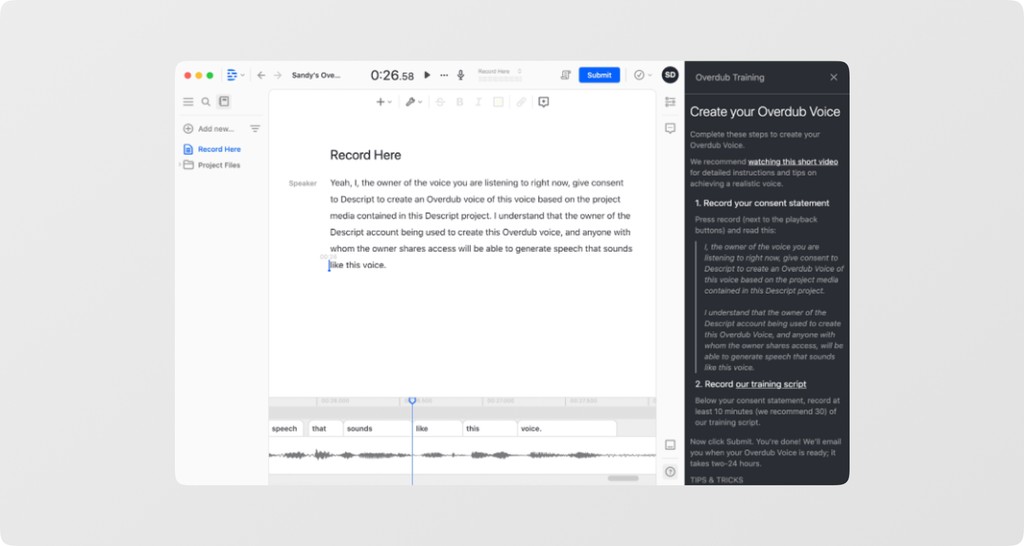
Descript is a video editing platform with AI tools for text-based editing, polishing recordings, and improving on-camera video. You can use it to produce short product walkthroughs, but its focus is editing video rather than building click-through demos.
Descript features
- Underlord: An AI editor that can turn a raw recording into a tighter cut
- Filler word removal: Cut filler words and retakes in a click
- Automatic Multicam: Edit multiple camera angles
- Publishing help: AI show notes, YouTube descriptions, and thumbnails
Descript pricing
Descript has a free plan with 1 media hour per month. Paid plans are priced per person: Hobbyist is $16 per month billed annually or $24 monthly, with 10 media hours; Creator is $24 billed annually or $35 monthly, with 30 media hours; and Business is $50 billed annually or $65 monthly, with 40 media hours. Enterprise is custom. Checked on descript.com/pricing, October 26, 2026.
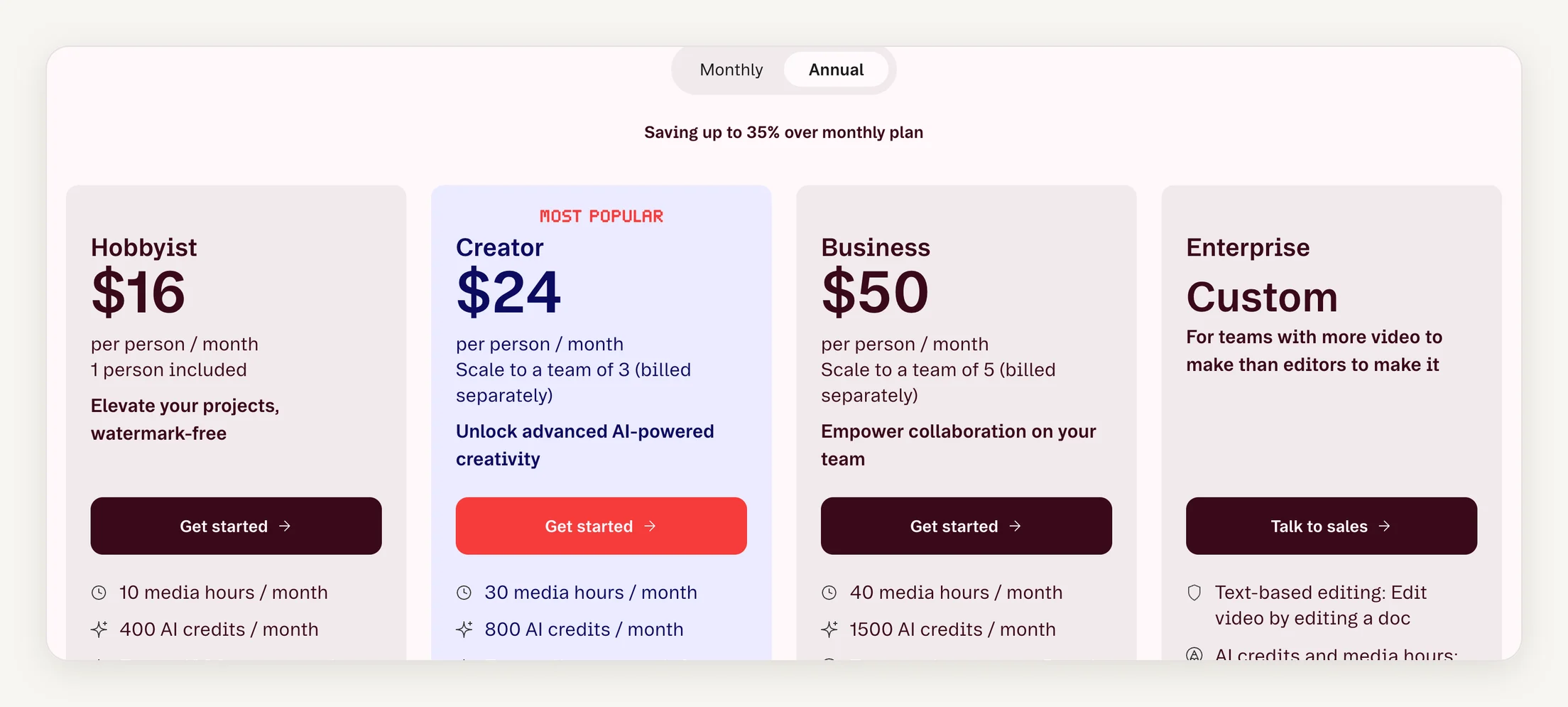
The main cost driver is usage: each plan includes a set number of media hours per person each month, and heavier use means a higher plan or top-ups.
TL;DR
Choose Descript if you prioritize polished video and want AI editing tools like Studio Sound, eye contact correction, and automatic multicam.
Skip it if you need click-through demos rather than edited video, or if per-person media-hour limits are a concern.
7. Chameleon
- Best for: Product teams needing interactive demos integrated with user onboarding
- Demo type: In-app tours, interactive demos
Chameleon pros
- Integrates with tools such as Mixpanel and HubSpot for targeting and in-app follow-up
- Demos sit alongside tours, checklists, launchers, and microsurveys in one platform
Chameleon cons
- No free plan listed; pricing is based on monthly tracked users
- Fuller interactive demo features are on the Growth plan, billed annually
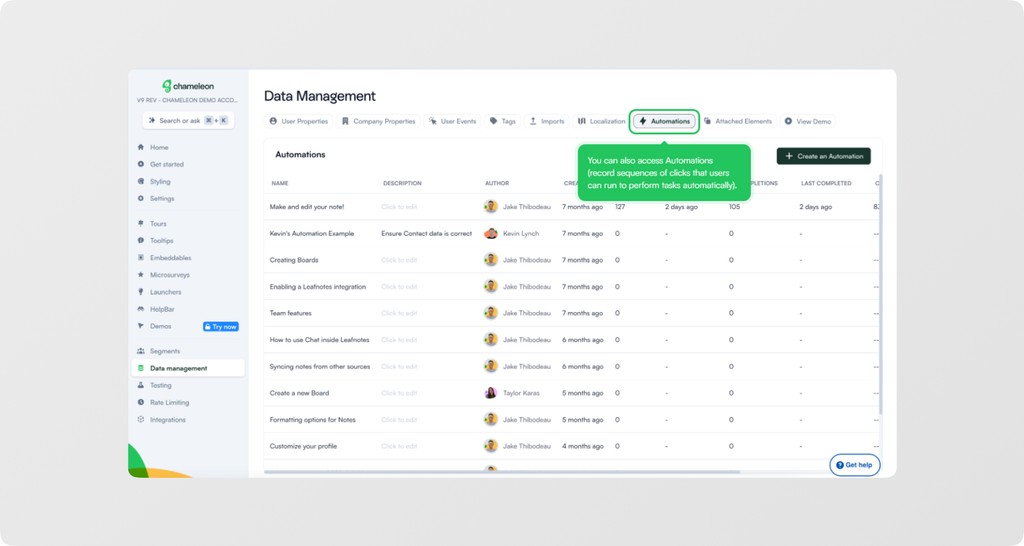
Chameleon is a product adoption platform focused on improving user onboarding with guided experiences, in-app tours, checklists, and microsurveys. It also offers an Interactive Demo Hub.
These demos complement Chameleon's in-product guidance. The platform's core is onboarding and adoption inside your product, rather than sales and marketing demos.
Chameleon features
- A/B testing: Create variations of in-app flows
- Outcome tracking: Monitor the outcomes of in-app experiences
- Microsurveys: Collect NPS and targeted feedback in the product
- Launchers and checklists: In-product widgets that open help and next steps
Chameleon pricing
Chameleon does not list a free plan. Its Startup plan starts at $279 for 2,000 monthly tracked users (MTUs). Pro starts at $750 per month for 5,000 MTUs, billed monthly, and Growth starts at $1,750 per month for 5,000 MTUs, billed annually. Interactive demos are basic on Pro and fuller on Growth. Enterprise is custom. Checked on chameleon.io/pricing, October 26, 2026.
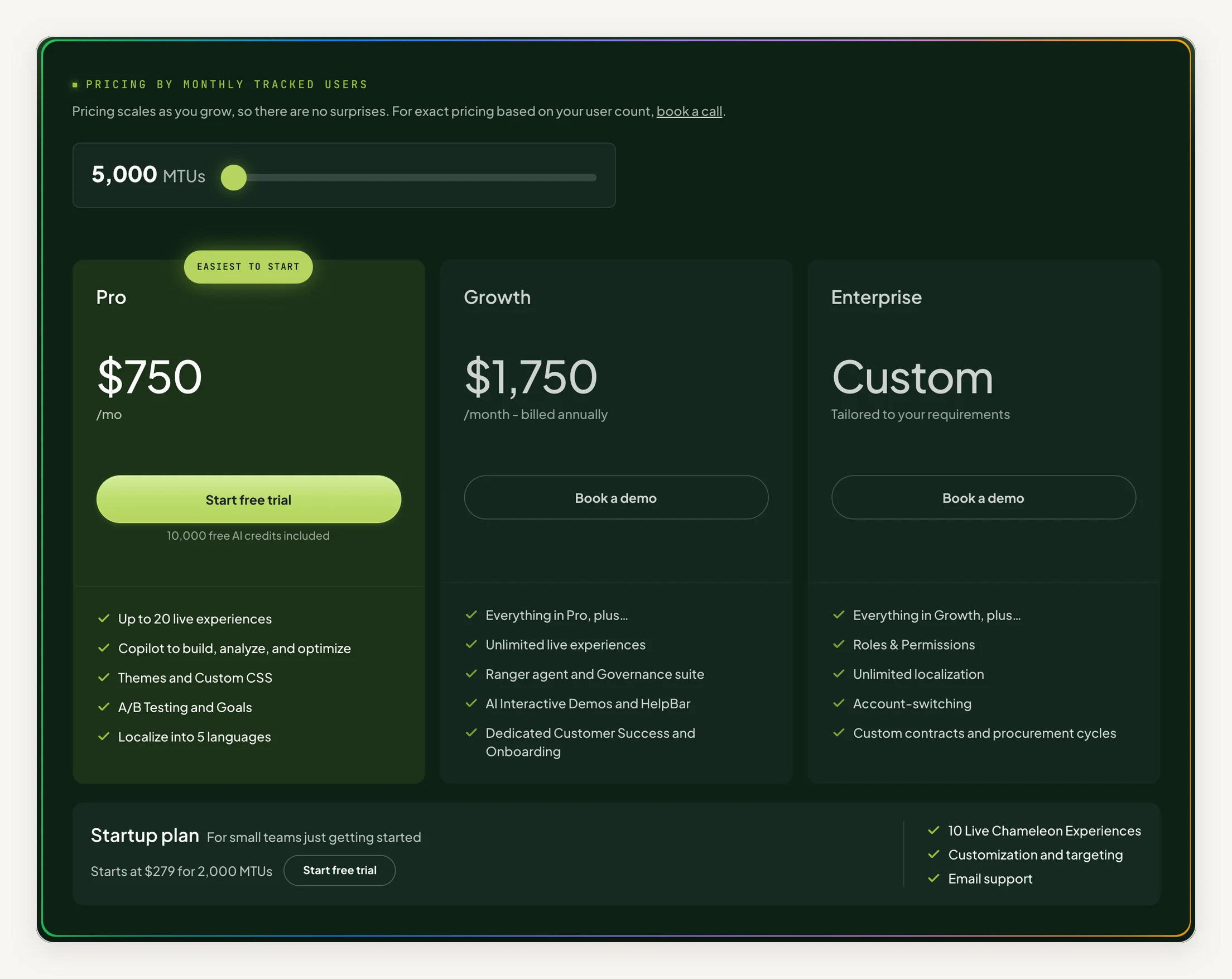
Costs scale with Monthly Tracked Users (MTUs), so pricing grows with your active user base rather than team size.
TL;DR
Choose Chameleon if you want demos as part of a broader in-product adoption program, alongside tours, checklists, and surveys.
Skip it if you mainly need demos for sales and marketing, or if MTU-based pricing doesn't fit your budget.
8. Intro.js
- Best for: Indie app developers who want budget-friendly, flexible in-app tours and can handle setup and maintenance themselves.
- Demo type: In-app tours
Intro.js pros
- Lightweight: about 10 kB with no external dependencies
- Free and open source under the AGPL license
- Full control over the code and styling
Intro.js cons
- Requires coding experience
- You install, debug, and maintain it in your own code
- Commercial sites need a paid commercial license
Intro.js is a lightweight, open-source JavaScript library for creating step-by-step product tours and onboarding guides within web applications. Its tours let you highlight UI elements, provide contextual instructions, and guide users through workflows in a sequential, easy-to-follow manner.
At about 10 kB with no external dependencies, it suits developers who want full control over in-app guidance.
Intro.js features
- Step-by-step tours: Highlight elements and guide users through a workflow
- Hints: Add tips to specific elements with the data-hint attribute
- Callbacks: Run your own code before or after each step, including async work
- Themes: Install themes, with custom themes included in some commercial licenses
Intro.js pricing
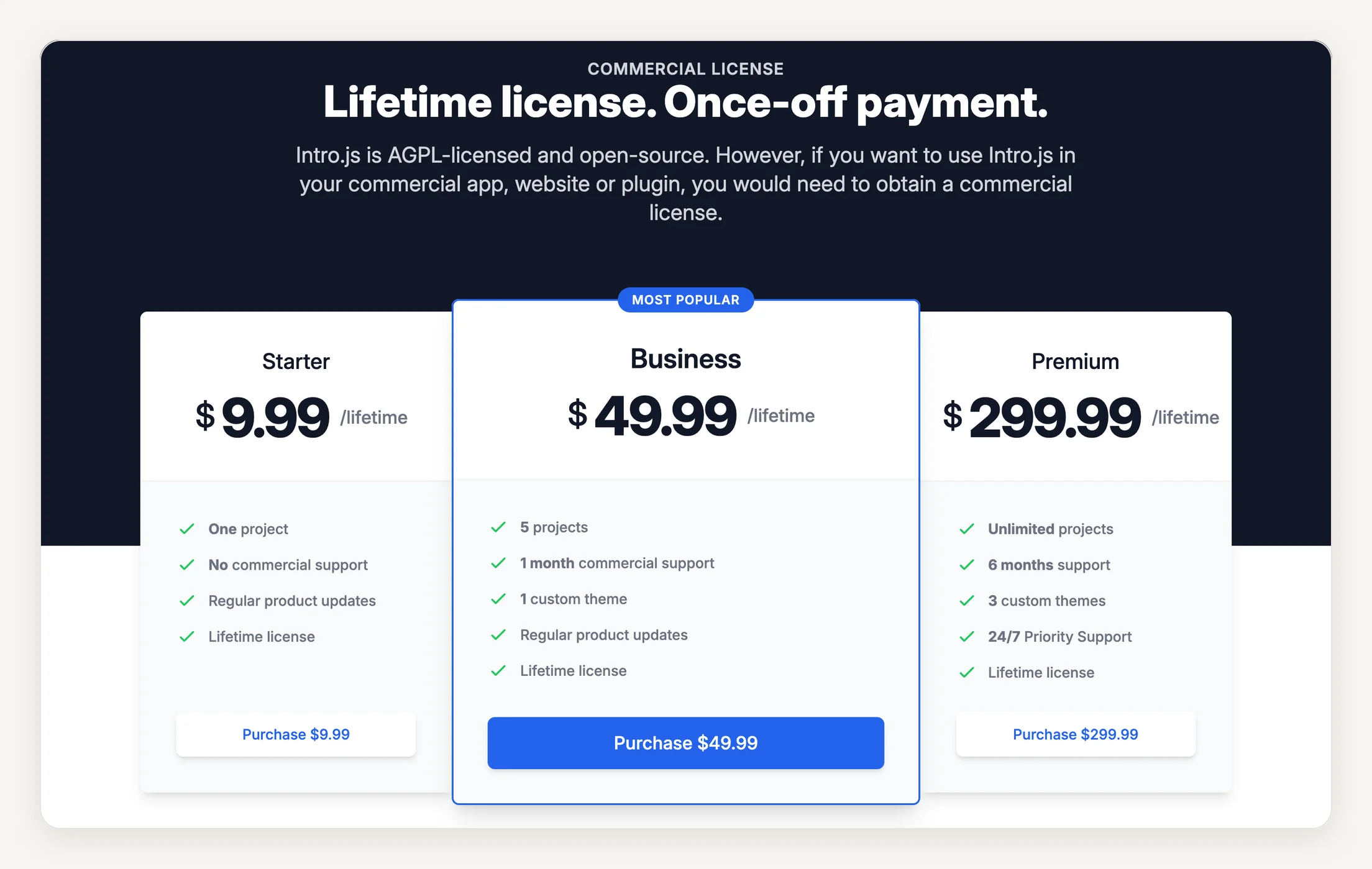
Intro.js is free under the AGPL open-source license for open-source, personal, and non-commercial sites. Commercial licenses are one-time payments: Starter is $9.99 for one project, Business is $49.99 for five projects, and Premium is $299.99 for unlimited projects. Checked on introjs.com, October 26, 2026. Unlike subscription-based tools, it costs little up front, with lifetime licenses starting under $10.
However, while upfront costs are minimal, the real expense comes from in-house implementation, customization, and ongoing maintenance, which can offset the initial savings compared to fully supported commercial tools.
TL;DR
Choose Intro.js if you're a developer wanting full customization control at minimal cost and can handle setup and maintenance by yourself
Skip it if: You lack coding experience, need ready-made features without development work, or want ongoing support
Must-have features of product walkthrough software
Not all walkthrough tools are the same. Basic screen recording might be enough for simple demos. The difference comes down to features that turn a demo into something useful. The right features affect how fast you create content, how engaged users are, and what insights you get.
Here are the key features to look for:
- Multi-format demo creation: Make video walkthroughs, interactive tours, and HTML demos from one recording. You can reuse content across onboarding, sales, and marketing without starting over.
- Advanced editing capabilities: Zoom, pan, annotate, and customize hotspots. Editing lets you highlight important areas, give context, and create polished demos that match your brand.
- Maintenance: Update one step when a screen changes, instead of rebuilding or re-recording the whole walkthrough. Ask each vendor what happens to the tour, the guide, and any video when you edit a step.
- Branching and conditional logic: Let users choose their path based on role, interest, or experience. This keeps demos relevant and more engaging.
- Engagement tracking: See which sections hold attention, where users drop off, and what actions they take. Data helps improve demos and show ROI.
- Team collaboration tools: Multiple editors, approval workflows, and shared workspaces keep teams coordinated. Look for comments and role-based access controls
- Customization and branding: Go beyond logos and colors. Use custom domains, branded players, and flexible designs to keep demos professional and consistent.
- Lead capture and CTAs: Add forms, calendars, or buttons to guide viewers to take action. Make it easy to turn users into leads without interrupting the experience.
- AI-powered automation: Use auto-generated scripts, demo delivery agents, and intelligent hotspot placement to improve the demo creation process and experience
How to choose your product walkthrough software?
Start with your needs, not features. Knowing what you want prevents mistakes and ensures the tool actually solves problems.
Define your requirements
Decide first where the viewer needs help: inside your product (in-app guidance), anywhere they can open a link (a captured walkthrough), or in a video they watch. Then map your customer journey to find key onboarding moments. Decide where product walkthroughs will have the most impact. Be honest about your team's technical skills. Some tools need developers, others are plug-and-play. List must-have and nice-to-have features based on real use cases.
Finally, set a realistic budget including implementation, training, and subscriptions.
Pro tip: Ask customer success and sales teams about onboarding pain points. They often highlight needs you might miss.
Evaluate tools
Test two or three shortlisted platforms using real user scenarios rather than polished demo data. Run parallel pilots when possible to compare engagement and user experience. Pay attention to support quality and responsiveness, and how well the platform integrates with your existing tools.
Pro tip: Make identical test scenarios for all tools. Time tasks like creating a 5-step tour with branching logic.
Making the final decision
Create a weighted scoring system based on your specific criteria rather than generic feature lists. Consider the total cost of ownership beyond monthly fees: implementation time, training costs, and potential migration complexity add up quickly.
Evaluate vendor stability and product roadmap alignment with your long-term needs. Ask for references from companies of your size in similar industries. Review recent product updates to see how fast the platform evolves and check the support model. Understand data portability and contract terms up front since switching later can be costly.
Pro tip: Don’t pick a tool just because it has flashy features you won’t use. Extra features often add complexity without real value. Don’t choose solely on price either. The cheapest option can end up costing more through limited functionality, poor support, or future switching costs.
Measuring the ROI of your product walkthrough software
Start by documenting your current costs. Count monthly support tickets about basic features, multiply by resolution time, and support reps' salaries. You can also track where users drop off during onboarding. Each drop-off represents lost revenue you can calculate using average customer lifetime value.
Once you add product walkthroughs to your sales, marketing, and onboarding workflows, calculate the following metrics: Sales metrics to track
- Demo-to-trial conversion rates
- Average sales cycle length
- Rep hours spent on basic product demos
Marketing metrics
- Website visitor-to-demo engagement rates
- Lead qualification scores
- Demo creation and update costs
Customer success KPIs
- Weekly hours spent on repetitive walkthroughs
- New user activation rates at each milestone
- Time-to-value for new customers
Measure the same metrics monthly. Look for support ticket reductions, improved activation rates, and faster user onboarding. Track sales improvements: higher conversion rates, shorter deal cycles, more strategic rep conversations.
Finally, don't forget internal productivity gains. Measure new hire time-to-competency and the hours your senior team saves on training.
Best practices for creating a product walkthrough
The difference between a walkthrough that converts and one that gets ignored often comes down to execution. Here are five best practices that separate high-performing teams from the rest:
- Start with the outcome, not the features: Don't walk users through every button and menu. Focus on what they want to accomplish. Instead of "Here's our reporting dashboard," try "Let's see how you'd track your top KPIs in under 2 minutes."
- Keep it short and modular: Break complex workflows into 3-5 minute modules that users can consume when they need them. This also makes it easier to update individual sections when your product changes, rather than re-recording everything from scratch.
- Use real data, not "lorem ipsum" examples: Generic placeholder content kills credibility instantly. Show realistic customer names, actual use cases, and data that reflects your users' world.
- Add progressive disclosure based on user behavior: Not every user needs the same level of detail. Set up branching logic so first-time visitors get the basics, while returning users can jump straight to advanced features. You can also track which paths get the most engagement and double down on what's working.
- Test your walkthroughs on actual users, not just internal teams: Your product team knows where everything is, but your users don't. Run your walkthroughs past customers or prospects before publishing. You'll catch confusing transitions, missing context, and steps that seemed obvious to you but aren't to them.
Where Layerpath fits
Layerpath fits teams that maintain a library of product walkthroughs for customer education, onboarding, support, or internal training. One capture becomes an interactive tour, a step-by-step guide, and a video export, so you can reuse it in your help center, onboarding emails, and training pages without starting from scratch.
When the product changes, you edit the steps that changed. The tour and the guide use the same steps, and you generate a new video export when you need an updated video. Insights show viewer drop-off, step replays, and completion rates, so you can see which walkthroughs people finish.
Want to try it on one real workflow? Start free or talk to sales.
Related reading
- Screen capture vs. HTML capture interactive demos tools: Which one is right for you?
- Customer onboarding software: a buyer's guide
- How customer education teams use Layerpath
Frequently asked questions (FAQs)
1. What is product walkthrough software?
Product walkthrough software helps you create guided experiences that showcase your product. It can include interactive demos, videos, and step-by-step tours that let users explore features and understand your product without needing live sessions.
2. When can you use product walkthroughs?
Use them wherever someone would otherwise ask for a live walkthrough: onboarding new customers, explaining a new feature, answering repeat support questions, and training new employees on software. In-app tours fit when the viewer is already inside your product. Shareable tours, guides, and videos fit help centers, emails, and follow-ups.
3. Is there any free product walkthrough software?
Yes. Several tools in this guide have a free plan, including Layerpath, Supademo, Navattic, Loom, and Descript, and Intro.js is free under an open-source license. A free plan is a good way to test a format on one real workflow before you pay.
4. What are some best practices for creating product walkthroughs?
Keep tours concise and goal-oriented, highlight key features, and guide viewers through relevant workflows. You can also use personalization for different audiences, include clear calls-to-action, and track engagement to see what resonates.
Ready to try it? Start free with Layerpath.