AlternativesUpdated

Trainual alternatives: 8 tools compared by job

Kirupa Lakshmanan

By Kirupa Lakshmanan, Head of Marketing at Layerpath. Prices and G2 ratings checked November 12, 2026.

On this page

What's the best Trainual alternative?

Whale and Waybook are the closest Trainual alternatives: SOPs, training paths, and tests in one tool, with prices on their pricing pages. The right pick depends on which part of Trainual you're replacing. SweetProcess is a procedure and policy library on one plan with every feature, and Process Street runs each SOP as a checklist with approvals. If your SOPs are mostly software tasks, Scribe and Tango capture a step-by-step guide as you click, and Layerpath (our product) fits when that guide should also be a walkthrough people click through and a video. Connecteam suits teams who train on their phones, not at desks. Trainual itself is a good choice for a company of 25 to 1,000 people that wants SOPs, policies, roles, and accountable training in one system. This table is a starting point by job, not a ranking.

Our product

Layerpath (our product)

For teams that train staff, clients, or customers on software and want one walkthrough people can click through, read as a step-by-step guide, or watch as a video.

What Layerpath does better than Trainual

  • A walkthrough people click through at a share link or in an embed, from the same project as the step-by-step guide and the video export.

  • Start from screenshots, a recording, or a Loom link, in the app or by asking Layerpath Agent in Slack, ChatGPT, or Claude.

  • A Free plan and prices on the pricing page, so a small team can start on Free or Pro without a demo or an implementation fee.

Entry price
Free for 1 seat (up to 3 published at a time); Pro $50 per seat a month, up to 3 seats; Team $500 a month with 5 seats (pricing). On Layerpath's pricing page, a seat is one person who creates and edits, and view-only members are free.
When to skip it
Skip it if you need a training system: assignments by role, quizzes, e-signatures, or a policy handbook. Layerpath doesn't do these; keep Trainual or use an LMS alongside it.

Disclosure: Layerpath publishes this page and appears in it. This page says where Trainual or another tool is the better buy.

Prices checked November 9 and 12, 2026; G2 ratings checked November 12, 2026.
ToolBest forEntry priceG2 ratingSkip it if
TrainualBaselineOne system for SOPs, policies, roles, and training, with tests, e-signatures, and completion tracking, for 25 to 1,000 employeesNo public price; quote after a demo, plus a one-time $1,000 implementation fee (pricing)4.7/5, 1,094 reviewsYou're a small team that wants to start today at a published price
WhaleSOPs from screen recordings, with training flows, quizzes, and usage and team insightsFree for 1 creator; Scale from $299/month billed annually, 3 creators (pricing)4.8/5, 214 reviewsYou only need written guides of software tasks
WaybookAn SOP playbook with learning paths, tests, and completion trackingFrom $99/month billed annually for 20 members; $119 monthly (pricing)3.5/5, 1 reviewYou want guides captured from your screen as you click, not written in an editor
SweetProcessProcedures, policies, and processes with quizzes and assigned tasks, on one plan with every feature$99/month for up to 10 members; $82.50 billed yearly (pricing)4.3/5, 5 reviewsYou want training paths by role and e-signatures more than a procedure library
Process StreetRecurring processes run as checklists, with approvals, conditional logic, and due datesNo public price; contact sales, with a 14-day Pro trial (pricing)4.6/5, 463 reviewsYour SOPs are reference and training, not checklists someone runs
ScribeStep-by-step guides of software tasks, captured as you click, exported as PDF, HTML, Markdown, or WordBasic free for web apps; Pro Team from $17 per seat/month, 5-seat minimum (pricing)4.8/5, 1,010 reviewsYou need training paths, tests, or e-signatures around the guides
TangoStep-by-step guides captured in the browser, with a Free plan for up to 10 usersFree for up to 10 users; Pro from $20 per user/month (pricing)4.7/5, 546 reviewsYou need training paths or tests, or only a few people create but every member would need a Pro seat
ConnecteamCourses, quizzes, documents, and onboarding in a mobile app for deskless teamsFree for up to 10 users; HR & Skills Basic from $35/month for the first 30 users (pricing)4.6/5, 3,506 reviewsYour team works at desks and mostly needs SOPs and software how-tos

Units differ: Layerpath and Scribe bill per seat, Tango per user, Whale per creator, Waybook and SweetProcess by team size with a charge per extra member, and Connecteam per hub for the first 30 users. Prices in USD, monthly unless marked annual, checked November 9 and 12, 2026; G2 ratings checked November 12, 2026. Trainual and Process Street publish no prices. Tango's G2 rating and review count include some reviews of an unrelated gift-card product also named Tango. Waybook's G2 listing has only 1 review and SweetProcess's only 5, too few to compare with the others.

Which alternative fits your reason for leaving?

  • You want SOPs and training in one tool, with a published price and a Free plan to start

    Whale, free for 1 creator and up to 10 members.

  • You want SOPs, learning paths, and tests for a team of up to 20 at one price

    Waybook, $99 a month billed yearly for 20 members.

  • You want a procedure and policy library with quizzes, without choosing a plan tier

    SweetProcess, one plan with every feature.

  • You want people to run each SOP as a checklist, with approvals and due dates

    Process Street.

  • Your SOPs are mostly software tasks and you want guides captured as you click

    Scribe or Tango.

  • Your team works on its feet and trains on phones

    Connecteam, free for up to 10 users.

  • You want people to click through the software steps, read them, and watch them, from one project

    Layerpath (our product).

What do G2 reviews and Trainual's pricing page say?

These are selected complaints from reviews and Trainual's own plan rules, not a summary of all reviews. Trainual's overall G2 rating is 4.7 out of 5. Quotes are verbatim, from G2 reviews.

  1. No published price, and a required implementation fee

    Trainual's pricing page lists Core, Pro, Premium, and Enterprise plans without prices. It answers "How much does Trainual cost?" with "Pricing and plans vary depending on the size of your team and the features you need", and asks you to book a demo. Implementation support is "Required" on every plan, and "A one-time implementation fee of $1,000 applies." (Trainual pricing)

  2. Built for 25 to 1,000 employees

    Trainual says it "is best suited for companies with 25 - 1000 employees" (Trainual pricing).

  3. Setup takes weeks of content building

    "The initial implementation was very lengthy and took several weeks of content building. Importing Word and PDF documents wasn’t compatible with the platform’s formatting, which made it difficult to bring existing content in cleanly." (G2 review, Mid-Market, Sep 30, 2026)

  4. Formatting and layout options are limited

    "I think Trainual could be better with more customization and flexibility, particularly in formatting or editing options." (G2 review, Mid-Market, Jul 16, 2026) "I’d still love to see more flexibility with the design and layout options, especially when building more customized training experiences." (G2 review, Mid-Market, Sep 28, 2026)

How is Layerpath different from Trainual?

TrainualLayerpath (our product)
OutputA company system for SOPs, policies, and processes, written in its editor with AI help, with built-in screen recording, flowcharts, tests, training paths, roles and responsibilities, and e-signatures.An interactive walkthrough from screenshots, a recording, or a Loom link, shared at a link or in an embed. The same project gives a step-by-step guide and an MP4 video export.
Pricing modelQuote only, by team size and features, across Core, Pro, Premium, and Enterprise, with a one-time $1,000 implementation fee (Trainual pricing).Per seat: one person who creates and edits. Layerpath Pro is $50 per seat a month, up to 3 seats; Team is $500 a month for 5 seats.
Free planNone on its pricing page; it offers a demo before you commit.1 seat, unlimited projects with up to 3 published at a time, each a walkthrough and a step-by-step guide, and 5 watermarked video exports a month.
When screens changeContent verification reminders, on every plan, schedule recurring reminders to review, update, and verify documentation, and from Pro, learners can flag training that's confusing or outdated.Screenshots go out of date after a release, and Layerpath doesn't remove that work either. You edit only the steps that changed, and the walkthrough and guide share those steps. You export a new video when you need one.

What Layerpath isn't. It isn't a training system or an LMS: it has no assignments by role, quizzes, e-signatures, or HR integrations, and its guides don't export to Word.

How Trainual and Layerpath bill. Trainual publishes no prices, so this page can't compare totals. Its pricing page says pricing varies by team size and features, and every plan carries a one-time $1,000 implementation fee (Trainual pricing). Layerpath's prices are on its pricing page: Free for one seat, Pro at $50 per seat a month for up to 3 seats, and Team at $500 a month for 5 seats.

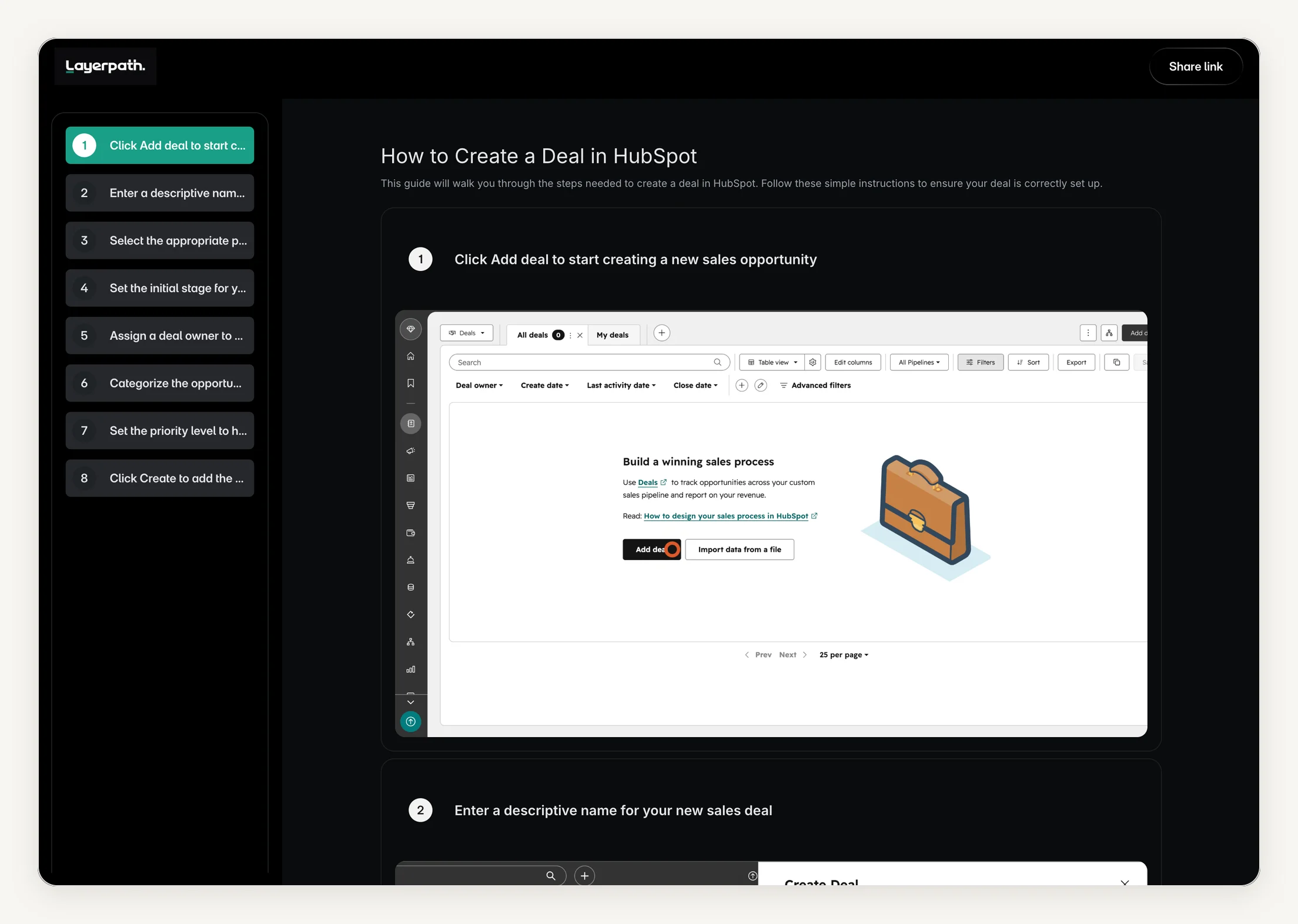
Interactive Layerpath walkthrough: How to create a deal in HubSpot. One Layerpath project of a HubSpot task, published as an interactive walkthrough. The same project also publishes as the step-by-step guide shown below it.

  1. Click Add deal to start creating a new sales opportunity
  2. Enter a descriptive name for your new sales deal
  3. Select the appropriate pipeline to track this deal's progress
  4. Set the initial stage for your new sales deal
  5. Assign a deal owner to manage this sales opportunity
  6. Categorize the opportunity by selecting a deal type
  7. Set the priority level to highlight urgent sales opportunities
  8. Click Create to add the deal to your pipeline
The same HubSpot project shown as a Layerpath step-by-step guide: a numbered list of steps on the left and the first step's screenshot on the right
The same Layerpath project published as a step-by-step guide, captured October 26, 2026.

When should you stay on Trainual?

Stay on Trainual when you want one system for SOPs, policies, roles and responsibilities, and the training that goes with them. Every plan includes AI-assisted documentation, built-in screen recording, flowcharts, tests with tracking and reporting, training by role, department, or location, due dates, content verification reminders, AI knowledge search, native HRIS and payroll integrations, and a Slack integration. Pro and above add training paths, SCORM uploads, video hosting with searchable transcriptions, and e-signatures (300 a year on Pro, unlimited on Premium and Enterprise) (Trainual pricing). For a company of 25 to 1,000 people that wants a handbook plus accountability, Trainual is the better choice, and no capture tool on this page replaces it. Choose Layerpath when the hard part is showing people the steps in a piece of software, and you want a walkthrough, a step-by-step guide, and a video export from the same steps.

What are you replacing?

Trainual does several jobs at once: a handbook, an SOP library, a training system, and a roles chart. Name the job you need first.

  • A training system at a published price

    If you want SOPs, training paths, and tests in one tool but with a price you can see, Whale and Waybook are the closest matches.

    See Whale or Waybook.

  • A procedure library without plan tiers

    If the job is a library of procedures and policies people look things up in, with quizzes and assigned tasks, SweetProcess sells one plan with every feature.

    See SweetProcess.

  • Checklists people run

    An SOP read once is a document. An SOP run every week is a checklist, with approvals and due dates. That is Process Street's job.

    See Process Street.

  • Software guides captured as you click

    If most of your SOPs are steps in software, a capture tool writes the steps and screenshots for you as you click.

    See Scribe or Tango.

  • Training on a phone for deskless staff

    If your team works in the field, on a shop floor, or on shifts, training has to live in the app they already open for schedules and tasks.

    See Connecteam.

  • One project as a walkthrough, a guide, and a video

    If the same software steps should be a walkthrough people click through at a link or in a help center, a step-by-step guide, and a video, pick a tool where one project gives all three.

    See Layerpath.

  • Screen recordings next to written docs

    If your training is Loom videos linked from Trainual pages, and both go out of date when the software changes, one Layerpath project gives a walkthrough, a guide, and a video export.

    See Layerpath.

The alternatives

Our product

Layerpath (our product), best when one walkthrough should also be a guide and a video

Choose Layerpath when the how-to is a software task people need to click through, read, and watch, and you want all three from one project.

Price
Free for one seat; Pro $50 per seat per month or $500 per year, up to 3 seats; Team $500 per month or $5,000 per year for five seats (layerpath.com/pricing, checked November 12, 2026).

What Layerpath does better than Trainual

  • A walkthrough people click through at a share link or in an embed, from the same project as the step-by-step guide and the video export.

  • A Free plan and published prices, so a small team can start without a demo or an implementation fee.

  • An MP4 video export built from the same steps, so a changed screen means editing a step and exporting again, not re-recording.

What Trainual still does better

  • Training around the content: training by role, tests, due dates, e-signatures, and completion tracking.

  • Policies, roles and responsibilities, and AI knowledge search in one company system.

  • Native HRIS and payroll integrations, and SCORM uploads from Pro.

Layerpath doesn't replace Trainual's training system. It has no assignments by role, quizzes, e-signatures, or HR integrations. It earns a place when the hard part is the software steps themselves. For a handbook with roles, tests, and sign-offs, Trainual, Whale, or Waybook is the better choice.

More detail

Trainual is where a company keeps its SOPs, policies, and roles, and trains people on them. Layerpath makes the software how-to itself: an interactive walkthrough from screenshots, a recording, or a Loom link, which people click through at a share link or in an embed in a help center, knowledge base, website, LMS, or Notion. The same project gives a step-by-step guide and an MP4 video export, and AI voiceover covers 34 languages. When the product changes, you edit only the steps that changed. The walkthrough and the guide use the same steps, and you export a new video when you need one.

Whale, best for SOPs and training in one tool at a published price

Choose Whale when you want what Trainual does for SOPs and training, with a Free plan to start and prices on the page.

Price
Scale $299 per month billed yearly ($399 billed monthly) with three creators included and $29 per extra creator billed yearly; Advance $599 billed yearly ($799 monthly) with five creators; Free for 1 creator and up to 10 members (checked November 12, 2026 against usewhale.io).
G2 rating
4.8/5, 214 reviewsChecked November 12, 2026

What Whale does better than Trainual

  • Published prices, a monthly option, and a Free plan for 1 creator and up to 10 members.

  • A video-to-SOP converter that turns a screen recording into a written SOP, on every plan.

  • AI voiceovers and a video editor, on Advance.

What Trainual still does better

  • Native HRIS and payroll integrations on every plan, where Whale lists SCIM and HRIS integrations on Enterprise.

  • A roles and responsibilities builder, and from Pro, the Delegation Planner for who owns which work.

Skip it if you only need written guides of software tasks; a capture tool costs less.

More detail

Whale records your screen and turns videos into SOPs, then wraps them in training flows, quizzes, and usage and team insights. Free covers 1 creator and up to 10 members, with the screen recorder, the video-to-SOP converter, one training flow, and one quiz. Scale raises that to 5 training flows and 15 quizzes and adds export to PDF and Word. Advance adds e-signatures on completion, a video editor and AI voiceovers, and contextual suggestions. Approval flows, SCIM, and HRIS integrations are on Enterprise.

Waybook, best for an SOP playbook with learning paths for small teams

Choose Waybook when you want SOPs, learning paths, and tests in one playbook, at a published price for a team of up to 20.

Price
Core $119 per month or $99 per month billed yearly, with 20 members included and $6 per extra member ($5 billed yearly); Pro $238 or $198 billed yearly, with $12 per extra member ($10 billed yearly) (checked November 12, 2026 against waybook.com).
G2 rating
3.5/5, 1 reviewChecked November 12, 2026

What Waybook does better than Trainual

  • A published price: Core is $99 a month billed yearly for 20 members ($119 monthly), with a 7-day free trial.

  • A 7-day free trial; Trainual offers a demo instead.

What Trainual still does better

  • Screen recording built into the editor on every plan; Waybook's recorder is a separate free tool.

  • A roles and responsibilities builder, and from Pro, the Delegation Planner for who owns which work.

Skip it if you want guides captured from your screen as you click, not written in an editor.

More detail

Waybook is a playbook for SOPs, policies, and training. Core includes learning paths with deadlines and a set order, tests and assessments, progress and completion tracking, an AI content writer, flow charts, revision history, PDF export, and Waybook AI Ask, which answers questions from your published documents. Pro adds document verification with review dates, approval stages before publishing, knowledge confirmation steps, SSO, and an MCP server. A free Waybook Record tool captures your screen for videos you embed in steps.

SweetProcess, best for a procedure and policy library on one plan

Choose SweetProcess when you want procedures, policies, and processes in one library, with quizzes and assigned tasks, and no plan tiers.

Price
$99 per month for a team of up to 10 members, or $82.50 per month billed yearly; each extra member $5 a month ($4.17 billed yearly) (checked November 12, 2026 against sweetprocess.com).
G2 rating
4.3/5, 5 reviewsChecked November 12, 2026

What SweetProcess does better than Trainual

  • A published price: $99 a month for up to 10 members ($82.50 billed yearly), with a 14-day free trial and no credit card.

  • Recording a workflow in the browser straight into a written procedure.

What Trainual still does better

  • Training paths and e-signatures, from Pro.

  • Native HRIS and payroll integrations.

Skip it if you want training paths by role and e-signatures more than a procedure library.

More detail

SweetProcess documents procedures, policies, and processes, which combine several procedures into one workflow, and turns them into tasks people check off. It has quizzes, version history, process maps, AI writing, a browser plugin that records a workflow straight into a procedure, a public or private knowledge base on your own domain, and export to PDF and Word. Every customer gets every feature. Its pricing section also says teams with fewer than 10 employees get pricing designed for smaller teams after starting a trial; that price isn't published.

Process Street, best when each SOP should run as a checklist with approvals

Choose Process Street when the SOP should run as a checklist every time, with approvals, conditional steps, and due dates.

Price
no public price; Startup, Pro, and Enterprise are quoted by sales (checked November 12, 2026 against process.st).
G2 rating
4.6/5, 463 reviewsChecked November 12, 2026

What Process Street does better than Trainual

  • Running a process as a checklist each time, with approvals, conditional logic, and enforced task order.

  • A 14-day free trial of Pro, with no credit card.

What Trainual still does better

  • Training around the content: tests, training paths, and e-signatures.

  • Roles and responsibilities, an org chart on Pro and above, and a team directory.

Skip it if your SOPs are reference and training, not checklists someone runs.

More detail

Process Street turns processes into workflows people run: tasks, forms, conditional logic, approvals, enforced task order, dynamic due dates, role assignments, and scheduled workflows. It calls itself a compliance operations platform, with Process AI and an AI compliance agent called Cora. Startup, Pro, and Enterprise are all priced through sales; Startup is for small businesses (fewer than 15 employees, under a revenue limit) and includes 5 users and 10 guests.

Scribe, best for step-by-step guides of software tasks, captured as you click

Choose Scribe when your SOPs are mostly software tasks and you want the guide written for you as you click.

Price
Basic free for web apps; Pro Personal $35 per seat per month ($25 billed yearly) from 1 seat; Pro Team $17 per seat ($13 billed yearly) from 5 seats (checked November 12, 2026 against scribe.com).
G2 rating
4.8/5, 1,010 reviewsChecked November 12, 2026

What Scribe does better than Trainual

  • Capture that writes the steps and screenshots for you as you click.

  • A Free plan for web-app guides, and published prices from $17 per seat a month on Pro Team.

What Trainual still does better

  • Training around the content: training by role, tests, due dates, and e-signatures.

  • Policies, roles, and the company handbook in the same place as the SOPs.

Skip it if you need training paths, tests, or e-signatures around the guides.

More detail

Scribe captures a workflow as you click and writes a step-by-step guide with screenshots, which you share as text, as a video, or as on-screen guidance inside a web app. Its pricing page lists video sharing and on-screen walkthroughs on every plan, and export to PDF, HTML, Markdown, and Word from Pro (Scribe pricing, checked November 12, 2026). It's a guide tool, not a training system: Scribe's pricing page lists no training paths or quizzes.

The Scribe alternatives page compares Scribe with the other guide tools.

Tango, best for browser-captured guides with a Free plan for small teams

Choose Tango when you want guides captured in the browser and a Free plan for up to 10 people.

Price
Pro $30 per user per month for 1 to 2 users, $20 for 3 or more ($22 and $15 billed annually); Free for up to 10 users (checked November 12, 2026 against tango.ai).
G2 rating
4.7/5, 546 reviewsChecked November 12, 2026

What Tango does better than Trainual

  • A Free plan for up to 10 users, and published Pro prices from $20 per user a month.

  • Capture in the browser that writes the steps and screenshots for you.

What Trainual still does better

  • Training around the content: training by role, tests, due dates, and e-signatures.

  • Policies, roles, and the company handbook in the same place as the SOPs.

Skip it if you need training paths or tests, or if only a few people create but every workspace member would need a Pro seat.

More detail

Tango captures a workflow in the browser and produces a step-by-step guide with screenshots. Free covers up to 10 users and 5 shared workflows, with link and embed sharing. Pro is priced per user and adds desktop capture, blurring, viewer insights, and export to PDF, Markdown, and HTML. On Pro, every workspace member is paid: Tango's FAQ says that when you upgrade to Pro, "you will need to upgrade all the members in your Workspace as well" (Tango pricing, checked November 12, 2026).

The Tango alternatives page compares Tango with the other guide tools.

Connecteam, best for deskless teams that train on their phones

Choose Connecteam when your team works on its feet, not at desks, and training has to live in the same phone app as schedules and tasks.

Price
HR & Skills Hub Basic $35 per month for the first 30 users ($29 billed yearly), then $0.60 per extra user a month ($0.50 billed yearly); Advanced $59 ($49 billed yearly); Expert $119 ($99 billed yearly); Small Business Plan free for up to 10 users (checked November 12, 2026 against connecteam.com).
G2 rating
4.6/5, 3,506 reviewsChecked November 12, 2026

What Connecteam does better than Trainual

  • Free for up to 10 users on the Small Business Plan.

  • Training in the same mobile app as the time clock, scheduling, and tasks.

What Trainual still does better

  • SOP writing: AI-assisted documentation, flowcharts, 500+ templates, and content verification reminders.

  • Roles and responsibilities, and AI knowledge search with answers linked to the source.

Skip it if your team works at desks and mostly needs SOPs and software how-tos.

More detail

Connecteam is a mobile app for deskless teams, sold as hubs. The HR & Skills Hub has courses, quizzes, documents, onboarding, and an org chart; the Operations Hub covers time clock, job scheduling, forms, and quick tasks; and the Communications Hub covers chat, updates, and a knowledge base. The Small Business Plan is free for up to 10 users, with all hubs (conditions apply; see Connecteam's pricing page).

Frequently asked questions

What is the best Trainual alternative for a small operations team?

It depends on what you used Trainual for. For SOPs and training in one tool at a published price, Whale (free for 1 creator; Scale from $299 a month billed yearly) and Waybook ($99 a month billed yearly for 20 members) are the closest. For a procedure library on one plan, SweetProcess is $99 a month for up to 10 members. If your SOPs are mostly software tasks, Scribe and Tango capture guides as you click, and Layerpath (our product) makes a walkthrough, a step-by-step guide, and a video export from one project. Prices checked November 12, 2026.

Is there a free Trainual alternative?

Trainual's pricing page lists no free plan; it offers a demo. Whale Free covers 1 creator and up to 10 members, Connecteam's Small Business Plan is free for up to 10 users, Tango Free covers up to 10 users and 5 shared workflows, Scribe Basic is free for web-app guides, and Layerpath's Free plan gives one seat unlimited projects with up to 3 published at a time. Waybook has a 7-day free trial, SweetProcess a 14-day trial, and Process Street a 14-day trial of Pro.

How much does Trainual cost?

Trainual doesn't publish prices. Its pricing page lists Core, Pro, Premium, and Enterprise plans, says pricing varies by team size and features, and asks you to book a demo. Implementation support is required on every plan, with a one-time implementation fee of $1,000. Trainual says it's best suited to companies with 25 to 1,000 employees.

Layerpath vs Trainual: which should I use?

They do different jobs. Trainual is a training and SOP system: it holds your policies, processes, and roles, assigns training by role, tests people, and tracks completion. Layerpath (our product) makes software how-tos: a walkthrough people click through, a step-by-step guide, and an MP4 video export from one project. Choose Trainual if you need assignments, tests, and e-signatures. Choose Layerpath if the hard part is showing people the steps in a piece of software. You can also keep both: a Layerpath walkthrough has a share link you can paste into a Trainual document.

Which Trainual alternative has quizzes and training paths?

Whale has training flows and quizzes (Scale includes 5 training flows and 15 quizzes; Advance has no limit). Waybook Core has learning paths, tests, and completion tracking. SweetProcess has quizzes and assigned tasks, and Connecteam's HR & Skills Hub has courses and quizzes. Scribe, Tango, and Layerpath (our product) make guides and walkthroughs, not quizzes or training paths.

How do you keep SOPs updated when your software changes?

Give each SOP an owner, review it whenever the software changes as well as on a schedule, and keep one copy people actually use. Trainual schedules reminders to review and verify content on every plan, and Waybook Pro adds review dates and approvals. Screenshots still go out of date after each release. In Layerpath (our product), the walkthrough and the step-by-step guide share the same steps, so you edit a changed step once for both and export a new video when you need one.

Can I make step-by-step guides from Slack or ChatGPT?

With Layerpath, yes. Mention @Layerpath in a Slack channel it's been added to, or message it directly, or ask in ChatGPT or Claude. Share screenshots, a recording, or a Loom link, and Layerpath Agent builds the walkthrough and its step-by-step guide. In Claude, add files in Layerpath's upload box. Trainual's Slack integration lets you "Search Trainual, share links, and create new content" from Slack.

Methodology and sources

Prices change, so every figure carries a date. Where a number here disagrees with a vendor's own pricing page, the vendor's page is correct.

Show all sources and notes
  • Trainual plans, its plan comparison table, and its FAQ (no published prices, the $1,000 implementation fee, the 25 to 1,000 employee fit, AI, screen recording, and video features): trainual.com/pricing, checked November 9, 2026 and rechecked November 12, 2026.

  • Layerpath plans: layerpath.com/pricing, checked November 9, 2026 and rechecked November 12, 2026.

  • Whale, Waybook, SweetProcess, Process Street, Scribe, Tango, and Connecteam: each vendor's own pricing page, checked November 9, 2026 and rechecked November 12, 2026, on monthly and yearly billing. Waybook's screen recorder: waybook.com/features. Process Street publishes no prices.

  • G2 ratings and review counts, checked November 12, 2026: Trainual, Whale, Waybook, SweetProcess, Process Street, Scribe, Tango, and Connecteam. Tango's G2 listing includes some reviews of an unrelated gift-card product also named Tango, so its rating and count do too.

  • Reviewer quotes: verbatim from the G2 reviews linked under "What do G2 reviews and Trainual's pricing page say?", posted July 16 to September 30, 2026.

  • Which tools are here: the tools most often named as Trainual alternatives in answers from Claude, Gemini, and Perplexity we checked on November 9, 2026, kept only where a small operations team would weigh them against Trainual.

  • Product-capability descriptions of the other tools are based on each vendor's own documentation and marketing, not a first-hand Layerpath test. We did not test them with an account.

Vendor pricing and capabilities change. Everything above was checked on November 12, 2026 and should be re-checked before this page is treated as current.

If your SOPs are mostly software guides, the same question asked about Scribe. Scribe alternatives, by job.

The same question asked about the browser-capture guide tool. Tango alternatives, by job.

Training and onboarding tools compared for employees and for customers. Best onboarding software, by job.

If you train with recorded videos, the same question asked about Loom. Loom alternatives, by job.

Make it once. Click, read, or watch it.

Start from screenshots, a recording, or a Loom link. Get a walkthrough, a step-by-step guide, and an MP4 video export from one project.

Start free