AlternativesUpdated

Clueso alternatives: 7 tools compared by job

Kirupa Lakshmanan

By Kirupa Lakshmanan, Head of Marketing at Layerpath. Prices and G2 ratings checked November 20, 2026.

On this page

What's the best Clueso alternative?

Trupeer is the closest Clueso alternative: like Clueso, it turns a screen recording into an AI video and a step-by-step document. The right pick depends on which part of Clueso you're replacing. Guidde builds a narrated how-to video from a capture of your clicks, Descript lets you edit the video yourself by editing its transcript, Scribe writes a step-by-step guide as you click with no video to produce, Supademo builds demos the viewer clicks through, and Loom records and shares a video as it is. Layerpath (our product) fits when the same steps should be a walkthrough people click through, a step-by-step guide, and a video. Clueso itself is a good choice when you want a polished product video and a help article from one recording, a slide deck, or a PDF. This table is a starting point by job, not a ranking.

Our product

Layerpath (our product)

For teams that train staff, clients, or customers on software and want one walkthrough people can click through, read as a step-by-step guide, or watch as a video.

What Layerpath does better than Clueso

  • A walkthrough people click through at a share link or in an embed, from the same project as the step-by-step guide and the video export.

  • Start from screenshots, a recording, or a Loom link, in the app or by asking Layerpath Agent in Slack, ChatGPT, or Claude.

  • When a screen changes, edit only that step: the walkthrough and the guide share it, and you export a new video when you need one.

Entry price
Free for 1 seat (up to 3 published at a time); Pro $50 per seat a month, up to 3 seats; Team $500 a month with 5 seats (pricing). On Layerpath's pricing page, a seat is one person who creates and edits, and view-only members are free.
When to skip it
Skip it if the main output should be a polished, edited video, made from a slide deck or a PDF, or with AI avatars and motion graphics. Layerpath can't use PDF, Word, or PowerPoint files, and its guides don't export to Word.

Disclosure: Layerpath publishes this page and appears in it. This page says where Clueso or another tool is the better buy.

Prices and G2 ratings as of November 20, 2026.
ToolBest forEntry priceG2 ratingSkip it if
CluesoBaselineAn edited product video and a step-by-step article from one screen recording, slide deck, or PDFFree with 10 minutes of video exports a month; Solo $50/month, or $40 billed yearly, 1 user (pricing)4.8/5, 144 reviewsYou export more than the plan's monthly cap (15 minutes of video on Solo), or people need to click through the steps, not watch them
TrupeerAn AI training video and a document from one recordingPro $49/month for 1 creator seat, $40 billed yearly (pricing)4.7/5, 70 reviewsYou need translation without moving to Scale, or recordings longer than 10 minutes on Pro
GuiddeNarrated how-to videos from a capture of your clicks, with PDF and PowerPoint exports on paid plansFree for up to 25 how-to videos; Pro from $29 per creator/month (pricing)4.8/5, 97 reviewsYou want a written article as the main output, not a narrated video
DescriptEditing a video yourself by editing its transcript, with AI tools for audio, filler words, and retakesFree for 1 media hour a month; Hobbyist from $24 per person/month, $16 billed yearly (pricing)4.6/5, 940 reviewsYou want a step-by-step article written from the recording, or you don't want to edit video at all
ScribeStep-by-step guides of software tasks, captured as you click, exported as PDF, HTML, Markdown, or Word on ProBasic free for web apps; Pro Team from $17 per seat/month, 5-seat minimum (pricing)4.7/5, 1,019 reviewsYour audience needs a narrated video
SupademoInteractive demos the viewer clicks through, shared as a link, an embed, a video, or a PDFFree for 1 creator and 5 demos; Scale from $50 per creator/month, $38 billed yearly (pricing)4.7/5, 669 reviewsYou want an edited video and a help article as the main outputs
LoomQuick screen recordings with a share linkFree Starter; Business from $18 per user/month (pricing)4.7/5, 2,599 reviewsViewers need a polished, narrated video or written steps

Units differ: Clueso bills by plan (1 user on Solo, 2 on Business), Layerpath and Scribe per seat, Trupeer per creator seat, Guidde and Supademo per creator, Descript per person, and Loom per user. Prices in USD, monthly unless marked yearly, checked November 20, 2026. Clueso, Trupeer, and Guidde also limit usage by plan: minutes of exported video, recording length, or number of videos.

Which alternative fits your reason for leaving?

  • You want the same job, a training video and a document from one recording, from another vendor

    Trupeer, from $49 a month for one creator seat.

  • You'd rather capture clicks than record a video, and still get a narrated video

    Guidde, free for up to 25 how-to videos.

  • You want to control every cut and the audio yourself

    Descript, which edits video by editing its transcript.

  • Your readers want written steps, not a video

    Scribe, free for web-app guides on Basic.

  • You want viewers to click through the product instead of watching

    Supademo for demos, or Layerpath (our product) for training on software.

  • You only need to record and send

    Loom, free on Starter.

  • You want people to click through the steps, read them, and watch them, from one project

    Layerpath (our product).

What do Clueso reviewers say?

These are selected complaints from reviews and Clueso's own plan limits, not a summary of all reviews. Clueso's overall G2 rating is 4.8 out of 5. Quotes are verbatim, from G2 reviews posted August 9 to October 19, 2026.

  1. Exports are capped every month

    Clueso's pricing page caps video and article exports on Free, Solo, and Business: 10 minutes of video and 10 articles a month on Free, 15 minutes and 15 articles on Solo, and 30 minutes and 30 articles on Business, with the year's quota up front on yearly plans. Its FAQ says: "If you exceed your limit, exports will be paused until your next renewal." Exporting the same video again doesn't count against the limit. (Clueso pricing)

  2. The price, and features held back for higher plans

    "The cost is a little steep, however I was able to negotiate with them to get a fair discount as a point of entry." (G2 review, Mid-Market, Aug 9, 2026) "When I tried to upload a free font, my Solo subscription wasn't enough; font uploads were only included in the Business plan, which was too much for me." (G2 review, Small-Business, Oct 19, 2026)

  3. Editing control is limited

    "More control over video editing, timeline trimming, and rendering options would really help as well." (G2 review, Mid-Market, Oct 1, 2026) "There are a few workflow quirks that aren't obvious upfront, like the correct order to do things in (design, voiceover, syncing) really matters, and getting it wrong can silently undo earlier work." (G2 review, Small-Business, Aug 20, 2026)

  4. Rendering takes time

    "Rendering can take a little longer than I’d like when I’m waiting to check the final video." (G2 review, Small-Business, Sep 19, 2026)

How is Layerpath different from Clueso?

CluesoLayerpath (our product)
OutputAn edited video with AI voiceover, captions, and visual effects, and a step-by-step article, from a screen recording, an uploaded video, a slide deck, or a PDF. Articles export to Word, PDF, HTML, or Markdown.An interactive walkthrough from screenshots, a recording, or a Loom link, shared at a link or in an embed. The same project gives a step-by-step guide and an MP4 video export.
Pricing modelBy plan, with monthly caps on video and article exports: Clueso Solo is $50 a month for 1 user ($40 billed yearly); Business is $150 a month for 2 users ($120 billed yearly).Per seat: one person who creates and edits. Layerpath Pro is $50 per seat a month, up to 3 seats; Team is $500 a month for 5 seats.
Free plan1 user, 10 minutes of video exports and 10 article exports a month, with a watermark.1 seat, unlimited projects with up to 3 published at a time, each a walkthrough and a step-by-step guide, and 5 watermarked video exports a month.
When screens changeClueso lists an auto update agent, which records and updates videos, as a paid add-on on Enterprise (Clueso pricing). On every plan, you can edit a video by chatting with Clueso's AI.Screenshots go out of date after a release, and Layerpath doesn't remove that work. You edit only the steps that changed, and the walkthrough and guide share those steps. You export a new video when you need one.

What Layerpath isn't. It isn't a video production tool like Clueso. It can't make a video from a slide deck or a PDF, and its guides don't export to Word.

How Clueso and Layerpath bill. For one person on monthly billing, Clueso Solo and Layerpath Pro both cost $50 a month. On yearly billing, Clueso Solo is $40 a month and Layerpath Pro is $500 a year, so Clueso costs less, with 15 minutes of video exports and 15 articles a month. For two people, Clueso Business is $150 a month ($120 billed yearly), and two seats on Layerpath Pro are $100 a month. On Layerpath's pricing page, Free includes 5 watermarked video exports a month and paid plans export without a watermark.

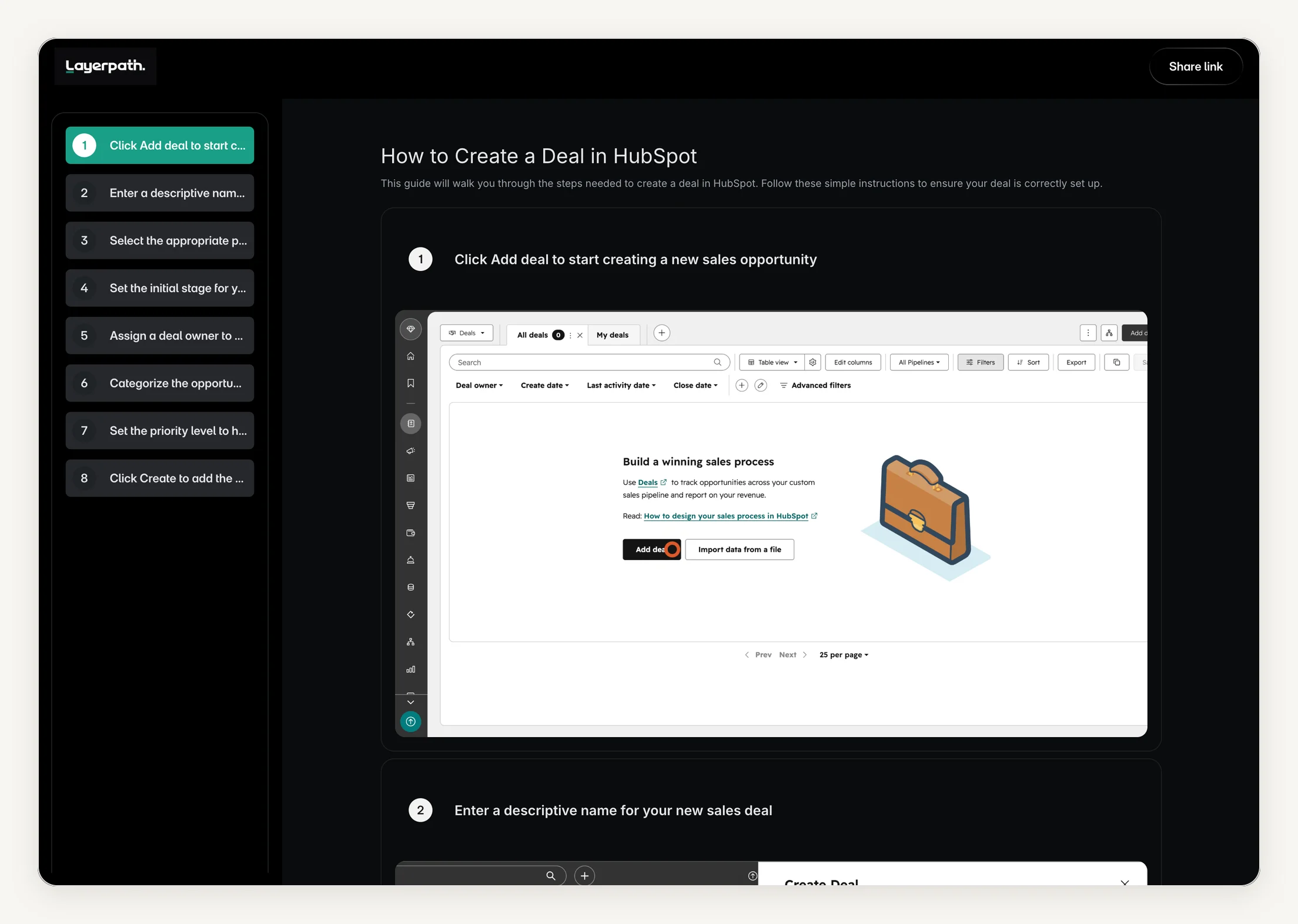
Interactive Layerpath walkthrough: How to create a deal in HubSpot. One Layerpath project of a HubSpot task, published as an interactive walkthrough. The same project also publishes as the step-by-step guide shown below it.

  1. Click Add deal to start creating a new sales opportunity
  2. Enter a descriptive name for your new sales deal
  3. Select the appropriate pipeline to track this deal's progress
  4. Set the initial stage for your new sales deal
  5. Assign a deal owner to manage this sales opportunity
  6. Categorize the opportunity by selecting a deal type
  7. Set the priority level to highlight urgent sales opportunities
  8. Click Create to add the deal to your pipeline
The same HubSpot project shown as a Layerpath step-by-step guide: a numbered list of steps on the left and the first step's screenshot on the right
The same Layerpath project published as a step-by-step guide, captured October 26, 2026.

When should you stay on Clueso?

Stay on Clueso when the output you need is a polished video. Every plan turns a screen recording, an uploaded video, a slide deck, or a PDF into a video with AI voiceover, captions, visual effects, and translation, and writes a step-by-step article you can export to Word, PDF, HTML, or Markdown (Clueso pricing, Clueso documentation). You edit the video by chatting with Clueso's AI. Business adds custom fonts, live team collaboration, and viewership analytics. Enterprise adds in-video quizzes, branching, SCORM export, and voice cloning. Its translation page lists more than 150 languages (Clueso translate). If your customers or staff learn by watching a produced video, Clueso is a strong choice, and no walkthrough tool on this page replaces it. Choose Layerpath when people need to click through the steps themselves, read them, and watch them, from one project.

First decide what you are replacing

Clueso turns one recording into two outputs, a video and an article. A Clueso alternative usually means a different balance between them. Name the job first.

  • The same video and document, from another vendor

    If you like the job Clueso does and want a different price shape or plan limits, Trupeer also turns a recording into an AI video and a document.

    See Trupeer.

  • A narrated video from a capture of your clicks

    Guidde captures a workflow as you click and builds a narrated video with AI voiceover, so you don't record a video first.

    See Guidde.

  • A video you edit yourself

    If you want to make every cut yourself, Descript edits a recording by editing its transcript.

    See Descript.

  • A written guide, no video

    If your readers would rather scan steps than watch, Scribe writes a step-by-step guide as you click.

    See Scribe.

  • A demo people click through

    If viewers should click through the product themselves, Supademo builds interactive demos from screenshots or video (captured HTML from Business).

    See Supademo.

  • A quick recording you send as it is

    If the video doesn't need editing, Loom records your screen and camera and gives you a link.

    See Loom.

  • One project as a walkthrough, a guide, and a video

    If the same steps should be a walkthrough people click through at a link or in a help center, a step-by-step guide, and a video, pick a tool where one project gives all three.

    See Layerpath.

The alternatives

Our product

Layerpath (our product), best when one walkthrough should also be a guide and a video

Choose Layerpath when people need to click through the steps, read them, and watch them, and you want all three from one project.

Price
Free for one seat; Pro $50 per seat per month or $500 per year, up to 3 seats; Team $500 per month or $5,000 per year for five seats (layerpath.com/pricing, checked November 20, 2026).

What Layerpath does better than Clueso

  • A walkthrough people click through step by step, at a share link or in an embed, from the same project as the guide and the video export.

  • Three seats on Layerpath Pro for $150 a month, where Clueso Business is $150 a month for 2 users.

What Clueso still does better

  • A produced video from a recording, an uploaded video, a slide deck, or a PDF, with AI avatars and motion graphics. Layerpath can't use PDF, Word, or PowerPoint files.

  • Video translation into more than 150 languages. Layerpath has AI voiceover in 34 languages, and translating a walkthrough changes its steps, callouts, and voiceover together.

  • Article exports to Word, PDF, HTML, and Markdown. Layerpath guides don't export to Word.

Layerpath doesn't replace Clueso's video production. If the deliverable is a polished product video or a launch video, Clueso is the better choice. Layerpath earns its place when people need to follow the steps themselves and the same steps should also be a guide and a video.

More detail

Clueso turns a recording into a produced video and an article. Layerpath makes an interactive walkthrough from screenshots, a recording, or a Loom link, and people click through it at a share link or in an embed in a help center, knowledge base, website, LMS, or Notion. The same project gives a step-by-step guide and an MP4 video export, and AI voiceover covers 34 languages. You can make and change walkthroughs in the app or by asking Layerpath Agent in Slack, ChatGPT, or Claude. When the product changes, you edit only the steps that changed. The walkthrough and the guide use the same steps, and you export a new video when you need one.

Trupeer, best for AI training videos and docs from one recording

Choose Trupeer when you want the job Clueso does, a video and a document from one recording, with different plan limits.

Price
Pro $49 per month ($40 billed yearly), one creator seat; Scale $249 per month ($199 billed yearly), three creator seats (checked November 20, 2026 against trupeer.ai).
G2 rating
4.7/5, 70 reviewsChecked November 20, 2026

What Trupeer does better than Clueso

  • Plan limits set by AI credits and recording length, not by minutes of exported video.

  • Room for a third person: Trupeer Scale covers three creator seats for $249 a month, where Clueso Business covers two users for $150.

What Clueso still does better

  • Translation on every plan; Trupeer adds AI translation on Scale.

  • Longer recordings on the entry paid plan: Clueso Solo takes videos up to 20 minutes, and Trupeer Pro records up to 10.

  • A Free plan with no end date; Trupeer's Free plan runs for 10 days.

Skip it if you need translation without moving to Scale, or recordings longer than 10 minutes on the entry plan.

More detail

Trupeer generates an AI video and a step-by-step document from a screen recording or an uploaded video. Pro covers one creator seat and recordings up to 10 minutes, with documents exported as DOC, PDF, or Markdown and the video as an MP4 with captions. Scale adds AI translation in videos and docs, a brand kit, and AI search across your videos and documents, for three creator seats. Its Free plan runs for 10 days.

Guidde, best when the documentation should be a narrated video

Choose Guidde when you want a narrated how-to video built from a capture of your clicks, with a Free plan to start.

Price
Pro $29 per creator per month ($19 billed yearly); Business $59 per creator a month ($39 billed yearly), for up to five creators; Free for up to 25 how-to videos (checked November 20, 2026 against guidde.com).
G2 rating
4.8/5, 97 reviewsChecked November 20, 2026

What Guidde does better than Clueso

  • A Free plan for up to 25 how-to videos.

  • Unlimited how-to videos on Guidde Pro at $29 per creator a month, where Clueso Solo is $50 a month with 15 minutes of video exports.

  • Interactive demos from the same capture, on Business.

What Clueso still does better

  • AI avatars and motion graphics on every plan; Guidde sells avatars as an add-on.

  • Turning slide decks and PDFs into videos on every plan; Guidde does it on Business.

Skip it if you want a written article as the main output, not a narrated video.

More detail

Guidde captures a workflow as you click and assembles a narrated video with AI voiceover and generated step text. Free covers up to 25 how-to videos. Pro adds unlimited how-to videos, a brand kit, blurring, and exports to video, PowerPoint, and PDF. Business adds desktop capture, turning PDFs, PowerPoints, and Docs into videos, interactive demos, and analytics, for up to five creators.

Descript, best when you want to edit the video yourself

Choose Descript when you want full control of the edit and would rather edit a transcript than a timeline.

Price
Hobbyist $24 per person per month ($16 billed yearly); Creator $35 ($24 billed yearly); Business $65 ($50 billed yearly); Free with 1 media hour a month (checked November 20, 2026 against descript.com).
G2 rating
4.6/5, 940 reviewsChecked November 20, 2026

What Descript does better than Clueso

  • Making every cut yourself by editing the transcript, with AI tools for audio, filler words, and retakes.

  • A lower entry price on yearly billing: Descript Hobbyist is $16 a month billed yearly, against Clueso Solo's $40.

What Clueso still does better

  • A step-by-step article written from the same recording, exported to Word, PDF, HTML, or Markdown.

  • A narrated product video with AI voiceover and visual effects from a screen recording, without editing it by hand.

Skip it if you want the step-by-step article written for you, or you don't want to edit video at all.

More detail

Descript edits audio and video by editing a transcript, with AI tools such as Studio Sound, Remove Filler Words, and its AI co-editor, Underlord. Hobbyist includes 10 media hours a month and 1080p export, Creator 30 hours and 4K export, and Business 40 hours, a team-wide Brand Studio, and translation and dubbing in more than 30 languages.

Scribe, best when readers want a written guide, not a video

Choose Scribe when the people you teach would rather scan and search steps than watch a video.

Price
Basic free for web apps; Pro Personal $35 per seat per month ($25 billed yearly) from 1 seat; Pro Team $17 per seat ($13 billed yearly) from 5 seats (checked November 20, 2026 against scribe.com).
G2 rating
4.7/5, 1,019 reviewsChecked November 20, 2026

What Scribe does better than Clueso

  • A guide captured as you click, with no video to record or edit.

  • A lower price for a team: Scribe Pro Team is $17 per seat a month from 5 seats, $85 for five, against Clueso Business at $150 for 2 users.

What Clueso still does better

  • A narrated, edited video as the main output.

  • Translation on every plan; Scribe lists language translation on Enterprise.

Skip it if your audience needs to hear someone explain, not read steps.

More detail

Scribe captures a workflow as you click and writes a step-by-step guide with screenshots. Basic is free for web apps. Pro adds desktop capture, custom branding, redaction, and exports to PDF, HTML, Markdown, and Word. Every plan can share a guide as a video, but the guide is the main output.

Supademo, best for clickable interactive demos

Choose Supademo when you want a demo the viewer clicks through, with lead capture and analytics for sales and onboarding.

Price
Scale $50 per creator per month ($38 billed yearly); Business $249 per month ($199 billed yearly) with one creator and $50 per extra; Growth $450 per month ($350 billed yearly) for five creators; Free for 1 creator and 5 demos (checked November 20, 2026 against supademo.com).
G2 rating
4.7/5, 669 reviewsChecked November 20, 2026

What Supademo does better than Clueso

  • Demos the viewer clicks through, with branching, lead forms, and viewer analytics from Scale.

  • A Free plan with 5 interactive demos and 50 video recordings.

What Clueso still does better

  • A narrated, edited video and a step-by-step article as the main outputs.

  • Article exports to Word, PDF, HTML, or Markdown; Supademo exports SOPs as PDF or PNG.

Skip it if you want an edited video and a written article as the main outputs, not a demo to click through.

More detail

Supademo builds interactive demos from screenshots or video (captured HTML from Business) and records video in its own screen recorder. Its Free plan gives one creator 5 guided interactive demos and 50 video recordings, shared as a link, an embed, a video, or a PDF. Scale adds AI voiceovers, translation, branching, lead forms, and analytics.

The Layerpath vs Supademo page compares the two head to head.

Loom, best for quick recordings you send as they are

Choose Loom when the video doesn't need editing: record your screen and camera, then share a link.

Price
Business $18 per user per month, Business + AI $24; Starter free for up to 50 members (checked November 20, 2026 against loom.com).
G2 rating
4.7/5, 2,599 reviewsChecked November 20, 2026

What Loom does better than Clueso

  • Recording and sharing in one step, with no production to wait for.

  • A Free plan for up to 50 members, against Clueso Free's one user.

What Clueso still does better

  • A produced video with AI voiceover and visual effects, and a written article, from the same recording.

  • Translation of voiceover and captions on every plan.

Skip it if your viewers need a polished, narrated video or written steps.

More detail

Loom records your screen and camera and shares the video at a link. Starter is free for up to 50 members, with 25 videos per person and 5-minute recordings. Business removes those limits, and Business + AI adds video-to-text automation, AI workflows, filler-word removal, and auto chapters.

The Loom alternatives page compares Loom with the other video and guide tools.

Frequently asked questions

What is the best Clueso alternative?

It depends on what you use Clueso for. For the same job, an AI video and a document from one recording, Trupeer is the closest (Pro from $49 a month for one creator seat). For narrated how-to videos built from a capture of your clicks, Guidde starts free for up to 25 videos. To edit the video yourself, Descript edits video by editing its transcript. For written guides, there's Scribe, and for demos people click through, Supademo. Layerpath (our product) makes a walkthrough, a step-by-step guide, and an MP4 video export from one project. Prices checked November 20, 2026.

Clueso vs Trupeer: what's the difference?

Both turn a screen recording into an AI video and a step-by-step document, and both cost $40 a month for one person on yearly billing. On monthly billing, Clueso Solo is $50 and Trupeer Pro is $49. Clueso Solo takes videos up to 20 minutes and caps video exports at 15 minutes a month; Trupeer Pro records up to 10 minutes. Clueso includes translation on every plan; Trupeer adds AI translation on Scale, at $249 a month for three creator seats. Clueso's Free plan has no end date; Trupeer's runs for 10 days. Prices checked November 20, 2026.

Is there a free Clueso alternative?

Clueso has a Free plan itself: 1 user, with 10 minutes of video exports and 10 article exports a month and a watermark. Guidde Free covers up to 25 how-to videos, Scribe Basic is free for web-app guides, Supademo Free gives one creator 5 interactive demos and 50 video recordings, Loom Starter is free for up to 50 members with 5-minute recordings, and Descript Free includes 1 media hour a month. Layerpath's Free plan gives one seat unlimited projects with up to 3 published at a time and 5 watermarked video exports a month. Trupeer's Free plan runs for 10 days.

How much does Clueso cost?

Clueso Free is $0 for 1 user, with 10 minutes of video exports a month. Solo is $50 a month for 1 user ($40 billed yearly), with 15 minutes of video exports and 15 articles a month. Business is $150 a month ($120 billed yearly) for 2 users, with 30 minutes and 30 articles a month. Enterprise is priced by agreement. On yearly plans, you get the year's export quota up front, and if you go over the limit, exports pause until your next renewal. Prices checked November 20, 2026.

Layerpath vs Clueso: which should I use?

They make different things. Clueso makes a produced video, with AI voiceover, visual effects, and avatars, and a written article, from a recording, a slide deck, or a PDF. Layerpath (our product) makes a walkthrough people click through, a step-by-step guide, and an MP4 video export from screenshots, a recording, or a Loom link. Choose Clueso if the deliverable is a polished video. Choose Layerpath if people need to follow the steps themselves, by clicking through them or reading them, and you'd rather edit a changed step than produce the video again.

Which Clueso alternative makes interactive demos?

Supademo builds interactive demos from screenshots, video, or captured HTML, with lead forms and analytics for sales and onboarding. Guidde adds interactive demos on Business. Layerpath (our product) makes a walkthrough people click through, with the same steps as a step-by-step guide and a video export. Clueso's Enterprise plan adds interactive video: in-video quizzes, branching, lead forms, and clickable buttons.

How do you update a product video when the software changes?

Usually you edit the video or record it again. Clueso lists an auto update agent, which records and updates videos, as a paid add-on on Enterprise, and every plan can edit videos with AI chat. In Layerpath (our product), you edit only the steps that changed; the walkthrough and the step-by-step guide share those steps, and you export a new video when you need one.

Can I make a walkthrough and a guide from Slack or ChatGPT?

With Layerpath, yes. Mention @Layerpath in a Slack channel it's been added to, or message it directly, or ask in ChatGPT or Claude. Share screenshots, a recording, or a Loom link, and Layerpath Agent builds the walkthrough and its step-by-step guide. In Claude, add files in Layerpath's upload box. Clueso lists its MCP server on every plan, so AI agents can create and edit Clueso videos and documentation.

Methodology and sources

Prices change, so every figure carries a date. Where a number here disagrees with a vendor's own pricing page, the vendor's page is correct.

Show all sources and notes
  • Clueso plans, export limits, plan comparison table, and FAQ: clueso.io/pricing, on yearly and monthly billing, checked November 20, 2026. Article export formats: clueso.io/documentation; translation: clueso.io/translate; MCP server: clueso.io/mcp, checked November 20, 2026.

  • Layerpath plans: layerpath.com/pricing, checked November 20, 2026.

  • Trupeer, Guidde, Descript, Scribe, Supademo, and Loom: each vendor's own pricing page, checked November 20, 2026, on monthly and yearly billing.

  • G2 ratings and review counts, checked November 20, 2026: Clueso, Trupeer, Guidde, Descript, Scribe, Supademo, and Loom.

  • Reviewer quotes: verbatim from the G2 reviews linked under "What do Clueso reviewers say?", posted August 9 to October 19, 2026. Reviews G2 marks as from guest or non-business users were left out.

  • Which tools are here: tools that make one of Clueso's two outputs, a how-to video or a written guide, or that replace the video with a demo people click through. We chose them; this page is not a ranking.

  • Product-capability descriptions of the other tools are based on each vendor's own documentation and marketing, not a first-hand Layerpath test. We did not test them with an account.

Vendor pricing and capabilities change. Everything above was checked on November 20, 2026 and should be re-checked before this page is treated as current.

If your how-to videos start as Loom recordings, the same question asked about Loom. Loom alternatives, by job.

If you want AI avatar videos more than screen recordings, the tools for that job. Synthesia alternatives.

If a written guide is the output you need, the same question asked about Scribe. Scribe alternatives, by job.

If the choice is a narrated video or a written guide, the head-to-head compares the two. Guidde vs Scribe.

Make it once. Click, read, or watch it.

Start from screenshots, a recording, or a Loom link. Get a walkthrough, a step-by-step guide, and an MP4 video export from one project.

Start free