
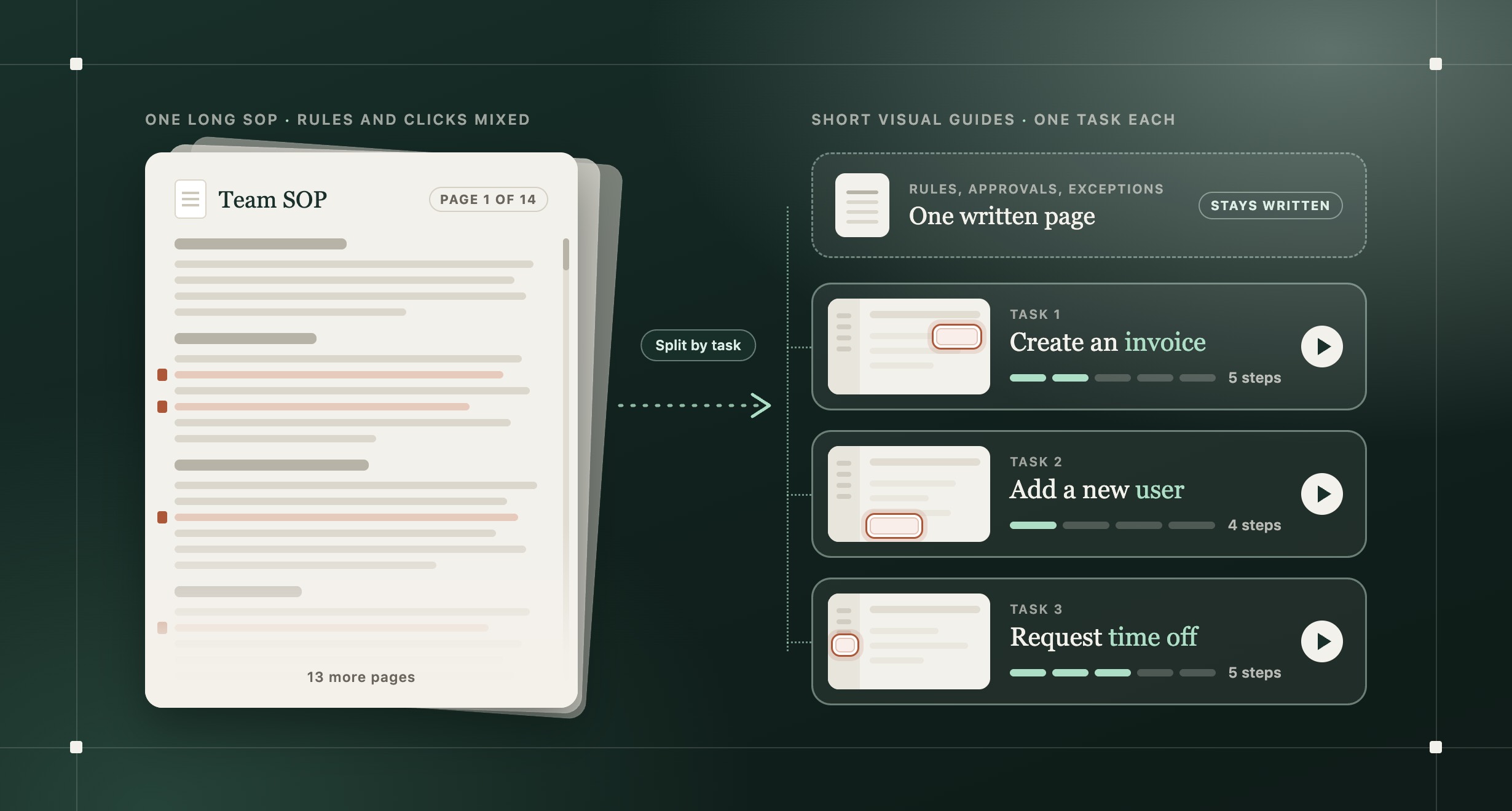
The short answer: Split the SOP by task. Keep the rules, approvals, and exceptions in a short written reference. Turn each task people do inside a tool into its own visual guide, with one screenshot and one instruction per action, short enough to follow in two or three minutes. Link every guide from the written page, and give each one an owner.
Why don't employees read or follow SOPs?
Most SOPs are written to be complete, then read by someone who needs one answer mid-task. The usual complaints:
- It names the system, but not the screen or what to click.
- It's one endless page, not broken into tasks.
- AI made it fast to write a thorough SOP, and thorough turned into dense.
- New people hesitate, so someone senior spends the day answering questions.
- The tool keeps changing, so the screenshots stop matching the screen.
The rules usually hold up. What breaks is every place someone has to do something inside a tool.
What should stay written, and what should become a visual guide?
An SOP says what has to happen. A visual guide shows how to do it in the tool.
| Part of the SOP | Best format | Why |
|---|---|---|
| Purpose, rules, approvals, and who owns what | A written reference people can scan | Rules and approvals stay easy to check |
| A task inside a tool, like creating an invoice or adding a user | A visual step-by-step guide, one per task | People follow it while they do the task |
| A task someone is learning, or one where movement matters | A short video or click-through walkthrough of that one task | Seeing the flow once makes the steps easier to follow |
| Judgment calls and exceptions | Written "if this, then that" lines, plus who to ask | A screenshot can't show a judgment call |
For example, an SOP might say: "Once the client approves the quote, raise the invoice in the billing system." Keep the rule (when to invoice, and who approves) on the written page. Then make a "Create an invoice" guide that shows each screen: starting a new invoice, the fields to fill in, the button that sends it, and the confirmation.
Here's what one task inside a tool looks like as a click-through walkthrough: raising a travel request in Zoho People.
Interactive Layerpath walkthrough: How to raise a travel request in Zoho People. An example of one task turned into a click-through walkthrough, from the Travel tab to Submit.
How do you make SOPs easier to follow?
- List the tasks hiding in the document. Mark every place someone has to do something in a tool, and name each task with a verb and an object, like "Add a new user." Start with what new people ask about most.
- Do each task once, and capture it. Use a test account and sample data. Record your screen or take one screenshot per action, including open menus, dialogs, and the confirmation, and blur private details. See when to use screenshots or a recording.
- Write one instruction per action, and mark the target. Start with a verb and use the exact label on screen: "Click New invoice." Highlight the target the same way on every step, and say what should appear next.
- Keep each guide to one outcome. Split it where the task has stages people might need on their own. Don't drop needed steps to hit a time limit.
- Turn the SOP into an index. Replace the click-by-click text with a link to each guide, and check that approvals, warnings, and exceptions are still on the page.
- Test it with someone new. Watch them follow the guide in the live tool without help, and fix every step where they pause.
How long should a training video be?
Keep each video to one task, and pair it with written steps people can skim. In a study of 6.9 million video sessions on edX, students watched about 2 to 3 minutes of each step-by-step tutorial video, however long the video was, and re-watched tutorials more often than lectures (Guo, Kim, and Rubin, 2014; PDF). The widely quoted advice to keep videos under six minutes comes from the same paper. For tutorials, its advice is different: "length does not matter as much, but support re-watching and skimming."
Those were online math and science courses, not workplace training, but the lesson carries over: make the few minutes people watch cover one whole task, and give them a written guide of the same steps for when they come back. The video is for the first time. The numbered guide is for every time after.
How do you write SOPs for contractors and non-native English speakers?
Write short, literal sentences with no idioms, keep the exact on-screen labels, and show a screenshot for every action. Across time zones, nobody is awake to explain a dense English document, and a screenshot of the right screen carries meaning when a sentence doesn't.
- The same word every time. If the button says Submit, don't write "send" in one step and "submit" in the next.
- Exact labels, even in translation. If the tool's interface is in English, keep button names in English in a translated guide, so people can match the words to the screen.
- Translate the steps, callouts, and narration, and add captions. Have someone who speaks the language test one translated guide in the live tool before you translate the rest.
How do you keep SOPs up to date when your software changes?
Fix the step that changed, not the whole guide, and make one person responsible for noticing. Otherwise people go back to asking in chat, and the real process ends up in someone's head.
- Give each guide one owner and a last-checked date.
- Crop to what people need to find the target, plus enough around it to get their bearings.
- Replace the screenshot and instruction when a label or button moves. Capture the task again when its order or logic changes.
For a full process, see how to update screenshots, guides, and videos after a release.
Visual SOP template and checklist
Copy this for each task:
- Task: a verb and an object, like "Create an invoice"
- Tool and access: which app, and which role or permission it needs
- Owner and last checked: a name and a date
- Steps: one screenshot per action, the target marked, and one instruction with the exact on-screen label
- Done when: the screen or message that shows it worked
- If the screen looks different: who to ask, and a link back to the rules page
Before you share it, check that:
- Someone new followed it in the live tool without help.
- It covers one outcome and takes a few minutes to follow.
- The old steps in the SOP now link to this guide.
Where Layerpath fits
Layerpath starts from the task, not the document: PDF, Word, and PowerPoint files can't be used to create a walkthrough. Do the task once and record your screen, upload screenshots, or share a Loom link. Layerpath turns it into one project that people can read as a step-by-step guide your team can use as an SOP, click through as a walkthrough, or watch as an exported video, so the first-time video and the look-it-up guide come from the same steps. Layerpath Agent writes a callout for each step, and you check them in the editor.
For teams that work in several languages, ask Agent in the Layerpath app, Slack, or ChatGPT to translate the walkthrough, and the steps, callouts, and voiceover change together. AI voiceover covers 34 languages. After translating, check that button names still match the screen. You can embed walkthroughs and guides in a help center, knowledge base, LMS, or Notion.
Layerpath doesn't spot changes in your software for you. When a screen changes, edit that step, then export videos and PDFs again. Agent can make mistakes, so review each walkthrough before you share it.
Frequently asked questions
What is a visual SOP?
A visual SOP is a standard operating procedure that shows each step instead of only describing it: a screenshot, the target marked, and a one-line instruction. It works best for tasks inside software, where the question is "where do I click?"
How long should an SOP be?
There's no fixed length. Each task guide should cover one outcome someone can follow in a few minutes. If they have to scroll past other tasks to find their step, split it.
Can AI turn an SOP document into a video?
Yes. Document-to-video tools narrate an SOP over slides or animation, which can work for policies. But if the SOP never shows where to click, the video won't either. For tasks inside software, capture the real screens, and check AI-written steps in the live tool before you share them.
How do you train new hires on internal tools without live calls?
List the tasks they'll do in their first week, in the order they'll need them. Give them one short guide per task, linked from one page, and a place to ask. When the same question comes up twice, add or fix a guide.